What can you do with the NordFX Telegram Mini App?
Short answer: The NordFX Telegram Mini App lets you check indicative market quotes, read analysis and educational articles, use a trading calculator and explore account options.
The NordFX Telegram Mini App brings market quotes, analysis, educational articles and trading tools into Telegram. Available through http://t.me/NordFXAppBot, it provides a compact way to access these resources without installing a separate application.
If you already use Telegram to read financial news or follow market discussions, you can open the Mini App to check a price, explore a topic or use a trading tool. Its three main sections — Markets, Insights and Tools — help you find the resources relevant to your task.
How to Open the Mini App
To get started:
- Open @NordFXAppBot in Telegram.
- Tap Start.
- Select Open NordFX App.
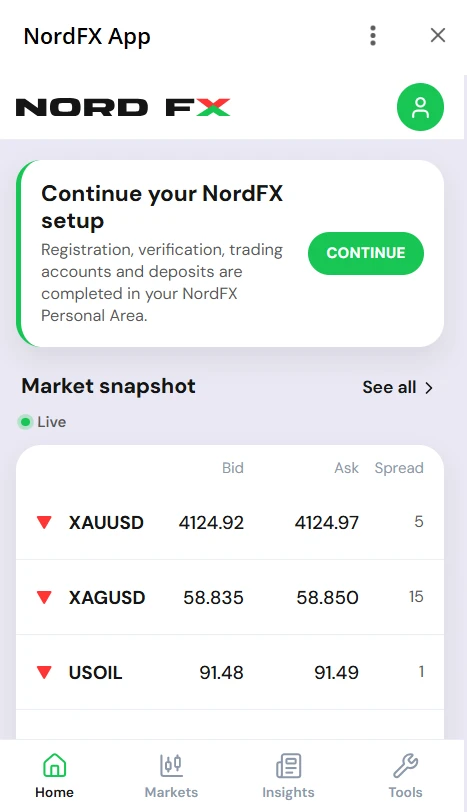
Once the application opens, choose the section you want to explore. Use Markets for quotes, Insights for analysis and education, or Tools for the trading calculator and account selector.
The Mini App provides access to information and tools. Registration and account management continue in your NordFX Personal Area, while trades are placed through your trading platform.
Markets: Check Indicative Prices
The Markets section displays indicative quotes across a range of instruments. It offers a convenient reference when you want to check the price shown for an instrument while using Telegram.
For example, a market discussion might draw your attention to a particular instrument. You can open Markets, find it among the available quotes and review the displayed information. If you want more context, move to Insights to look for relevant analysis.
“Indicative” means that the displayed price is a reference, rather than a guaranteed price at which an order can be executed. For order placement and executable prices, use your trading platform.
Insights: Find Analysis and Education
The Insights section brings together three types of NordFX content, each serving a different purpose.
Market Pulse covers market developments. It is a starting point when you want to read about events and themes affecting financial markets.
Forecast contains market outlooks and analysis of possible developments. When reading a forecast, check its publication date and the period it covers so you understand the context of the analysis.
Education contains articles explaining trading concepts and related topics. It is useful when you encounter an unfamiliar term or want to understand a subject in more detail.
These sections can complement one another. You might begin with a market update, read a forecast for a broader view, and then explore an educational article about a concept mentioned in the analysis. You can also go directly to Education whenever your main goal is learning.
Tools: Explore Calculations and Account Options
The Tools section includes a trading calculator and an account selector.
Use the trading calculator when you want to work through a calculation using your chosen inputs. Enter the information requested by the tool, review the output and check what each result represents. If you change an input, compare the new result with the previous one to understand how that change affects the calculation.
The account selector helps you explore NordFX account options. Use it to compare the available choices and identify the account features you want to examine more closely. Before proceeding, review the full conditions of the account you are considering.
The two tools serve different tasks: the calculator supports numerical comparisons, while the account selector helps you navigate account choices.
Access Your Account and Get Help
For registration and account management, follow the relevant links from the Mini App to your NordFX Personal Area.
If you need assistance, contact the NordFX support team through @NordFXSupportBot. Support can help with questions about accounts, verification, deposits and withdrawals, or trading platforms.
The two bots have distinct roles:
- @NordFXAppBot opens the Mini App with market information, analysis, education and tools.
- @NordFXSupportBot connects you with support for questions about NordFX services.
Open the NordFX Telegram Mini App, tap Start, then select Open NordFX App to explore its features.
Kembali Kembali