अंतिम अपडेट: अक्टूबर 2026
त्वरित उत्तर:
MetaTrader 4 में indicators जोड़ने के लिए, एक chart खोलें, Insert → Indicators पर क्लिक करें, indicator category चुनें, indicator select करें, जरूरत हो तो settings adjust करें, और OK पर क्लिक करें। Custom indicators को MT4 data directory के अंदर MQL4 → Indicators folder के through install किया जा सकता है।
MetaTrader 4 (MT4) में indicators जोड़ना platform के “Insert” menu या “Navigator” window के through किया जाता है। Traders built-in indicators जैसे RSI, MACD, Bollinger Bands, और Moving Averages को कुछ clicks में सीधे chart पर apply कर सकते हैं। MT4 custom indicators को भी support करता है, जिन्हें indicator files को platform के Indicators folder में copy करके और terminal restart करके manually install किया जा सकता है।
MetaTrader 5 (MT5) में MT4 की तुलना में अधिक built-in indicators और analytical tools शामिल हैं, हालांकि MT4 अपनी simplicity और custom indicators की बड़ी library के कारण अभी भी व्यापक रूप से उपयोग किया जाता है।
MetaTrader 4 में indicators क्या हैं?
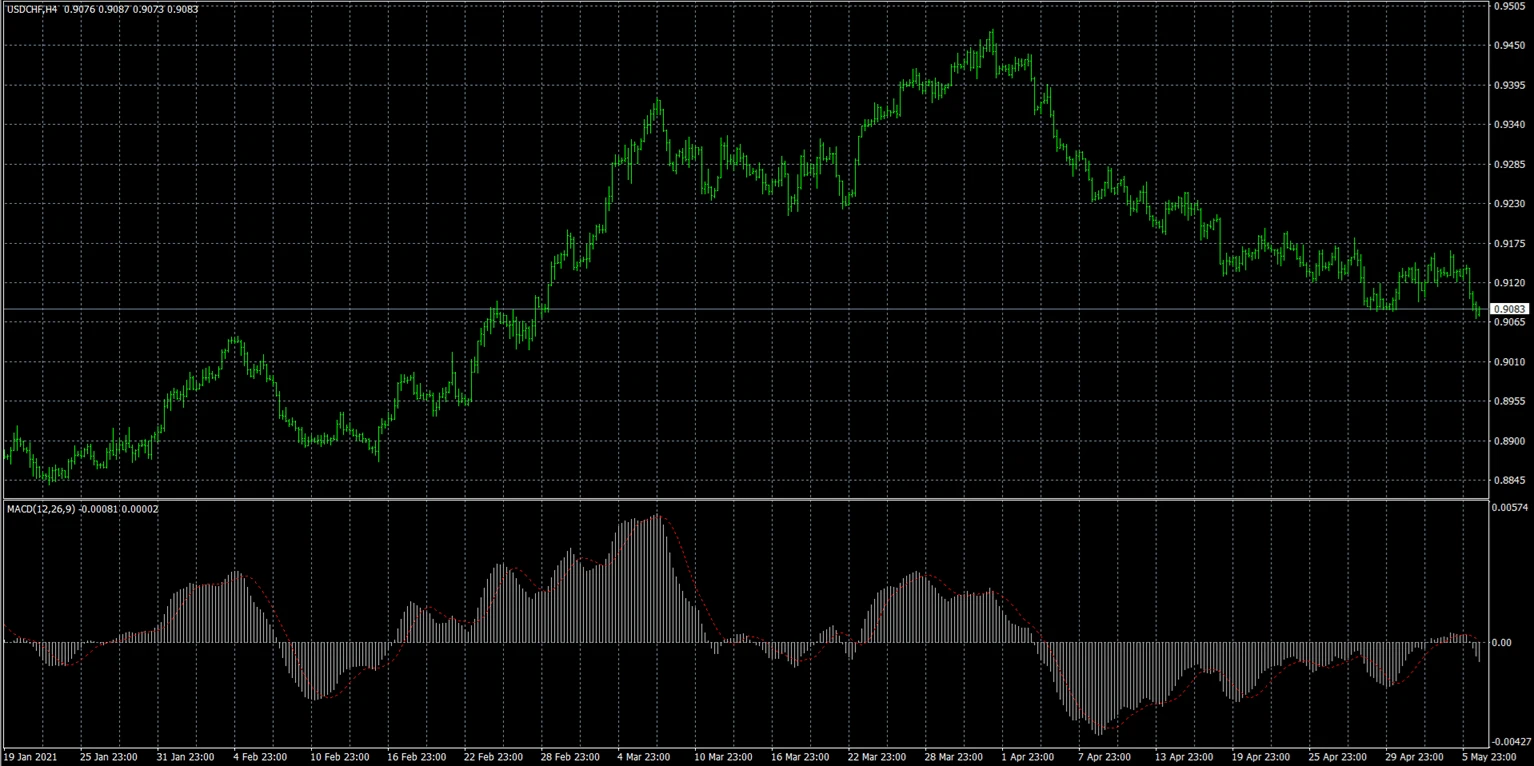
MetaTrader 4 में Indicators technical analysis tools हैं, जिनका उपयोग price action, market trends, momentum, और volatility का विश्लेषण करने के लिए किया जाता है।
MT4 में दर्जनों built-in indicators शामिल हैं और custom third-party indicators भी support होते हैं।
Indicators आमतौर पर इस तरह display किए जाते हैं:
- सीधे chart पर (trend indicators)
- chart के नीचे एक अलग window में (oscillators)
Built-in indicators
Built-in indicators पहले से ही MT4 trading platform में शामिल होते हैं।
उदाहरण:
- Moving Average
- RSI
- MACD
- Bollinger Bands
- Stochastic Oscillator
- ATR
इन indicators को बिना किसी अतिरिक्त file download किए तुरंत add किया जा सकता है।
Custom indicators
Custom indicators standard MT4 package के बाहर developers या traders द्वारा बनाए गए अतिरिक्त tools होते हैं।
इन्हें आमतौर पर manually install किया जाता है, उपयोग करके:
- .mq4 files
- .ex4 files
Custom indicators ये सुविधाएँ दे सकते हैं:
- unique trading signals
- visual overlays
- advanced analytics
- specialized trading strategies
Traders MT4 में indicators क्यों उपयोग करते हैं?
Traders MT4 में indicators का उपयोग करते हैं ताकि:
- market trends identify कर सकें
- momentum analyze कर सकें
- volatility detect कर सकें
- entry और exit decisions में सहायता मिल सके
- trading setups confirm कर सकें
Indicators market data को visually व्यवस्थित करने में मदद करते हैं और chart analysis को सरल बना सकते हैं, विशेषकर beginners के लिए।
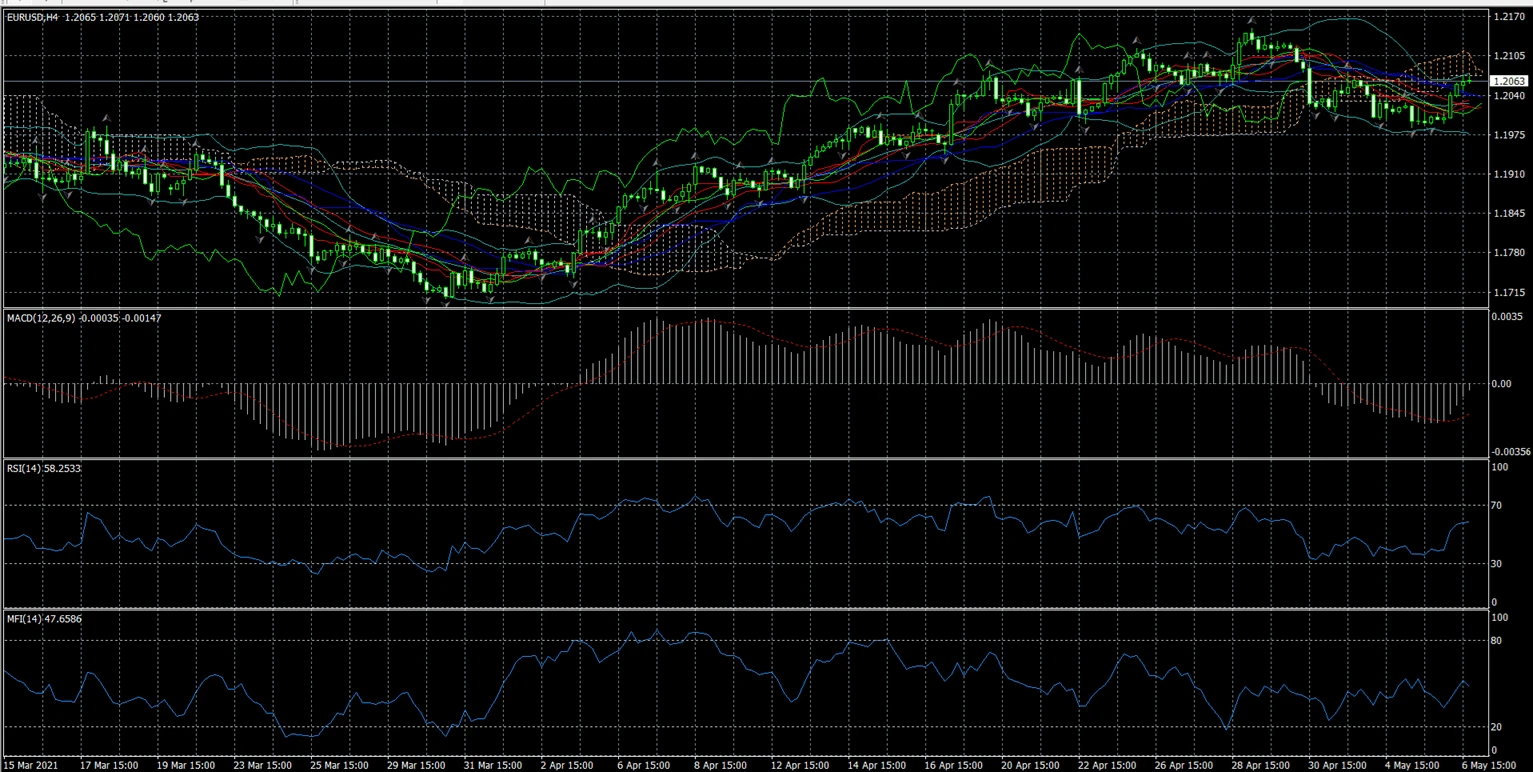
Observed MT4 trading behavior से पता चलता है कि कई beginner traders एक साथ बहुत अधिक indicators लगाकर charts को overload कर देते हैं, जिससे analysis बेहतर होने के बजाय अक्सर conflicting signals बनते हैं।
MetaTrader 4 में built-in indicators कैसे जोड़ें?
Built-in indicators सीधे MT4 interface से जोड़े जा सकते हैं।
इसके दो सामान्य तरीके हैं।
Method 1 — Insert menu का उपयोग करके
- MetaTrader 4 खोलें।
- एक trading chart खोलें।
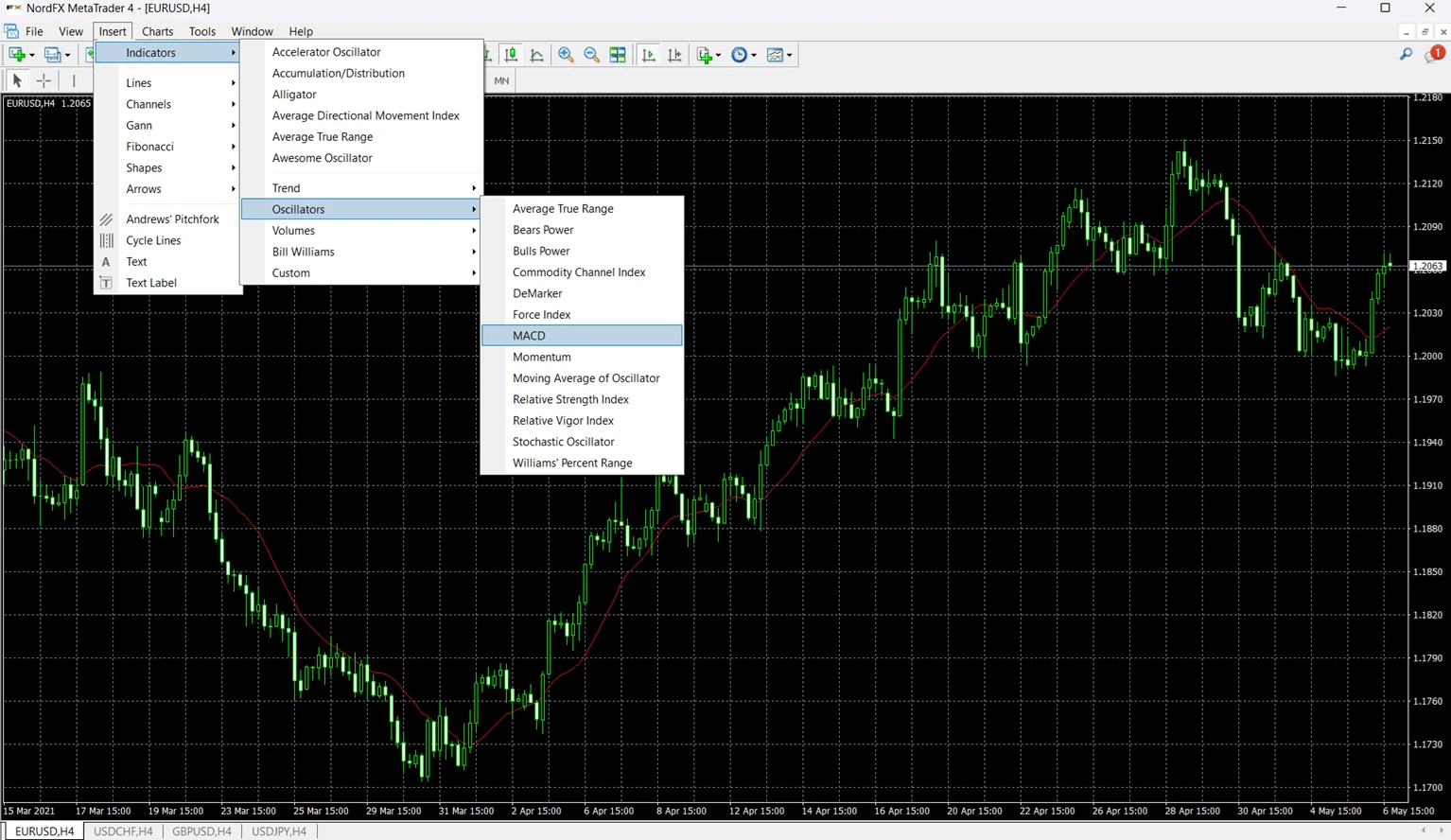
- ऊपरी menu में “Insert” पर क्लिक करें।
- “Indicators” चुनें।
- एक indicator category चुनें:
- Trend
- Oscillators
- Volumes
- Bill Williams
- indicator select करें।
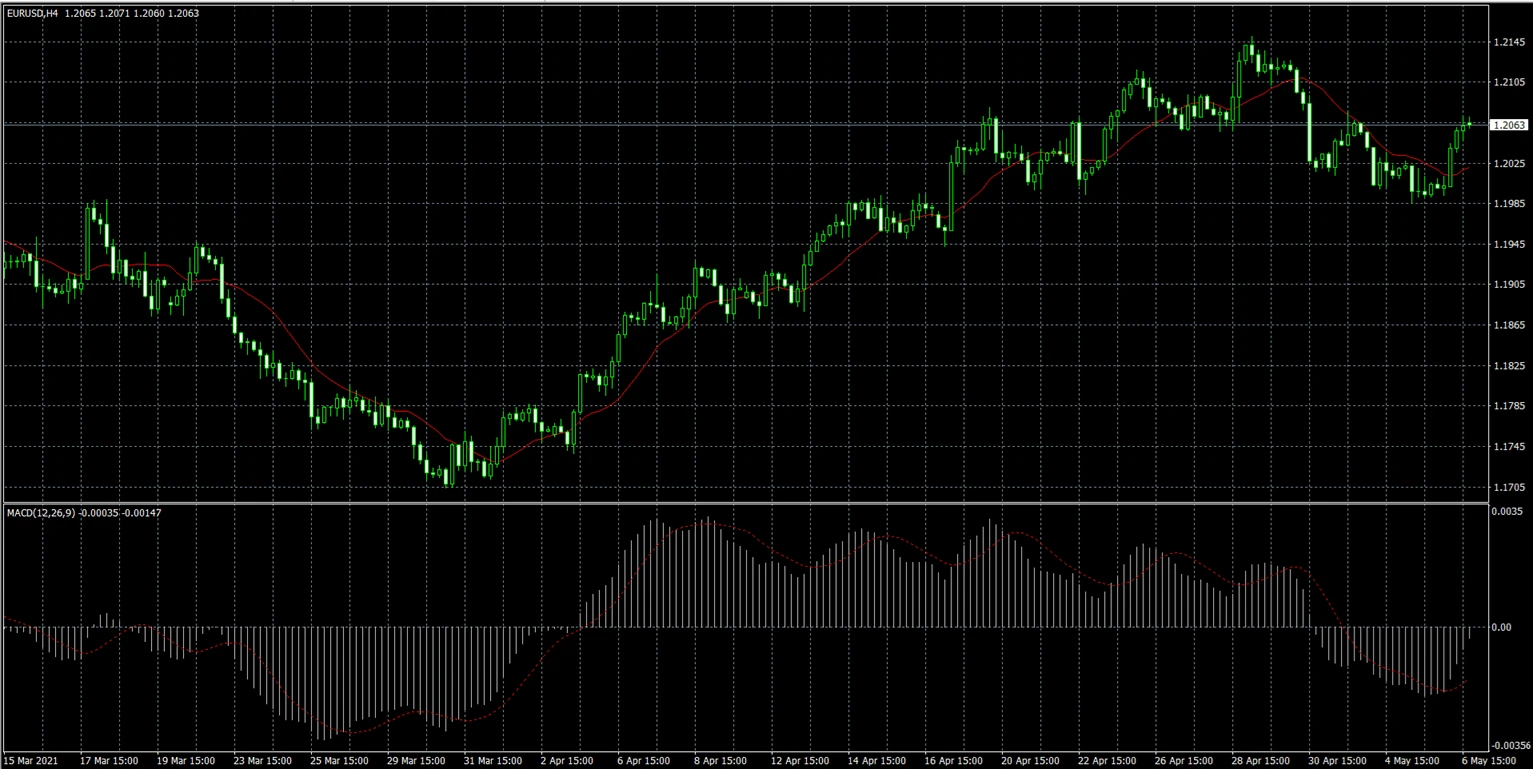
- जरूरत हो तो settings adjust करें।
- “OK” पर क्लिक करें।
Indicator तुरंत chart पर दिखाई देगा।
Method 2 — Navigator window का उपयोग करके
कई traders Navigator window का उपयोग करना पसंद करते हैं क्योंकि charts के बीच switch करते समय यह तेज़ होता है।
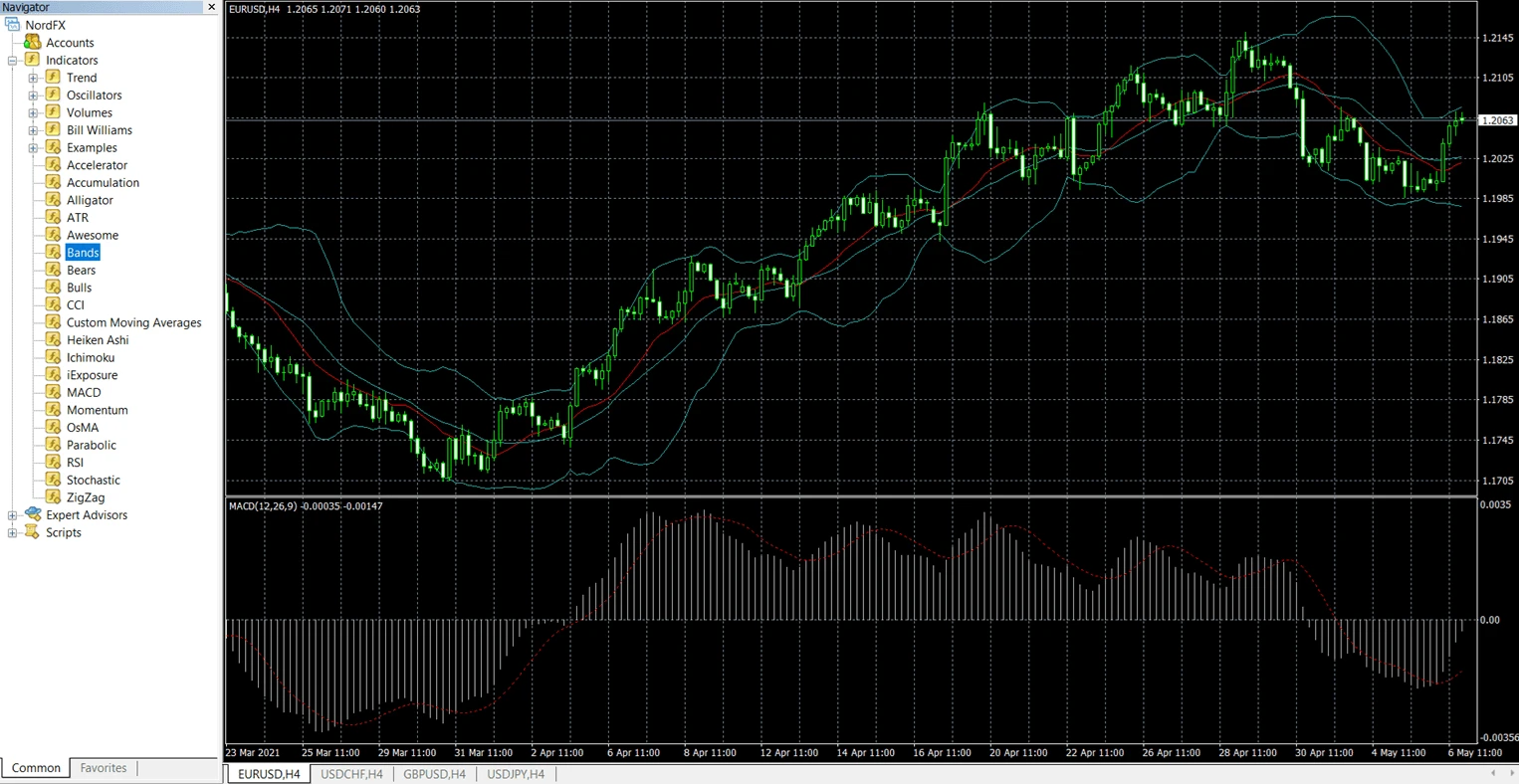
- “Navigator” panel (Ctrl+N) खोलें।
- “Indicators” section expand करें।
- Indicator को chart पर drag करें।
- जरूरत हो तो settings adjust करें।
- “OK” पर क्लिक करें।
Indicator तुरंत दिखाई देगा।
MT4 custom indicators किस file formats का उपयोग करते हैं?
अधिकांश custom MT4 indicators इन file formats में से एक का उपयोग करते हैं:
File Format | Meaning |
.mq4 | Editable MetaQuotes source code file |
.ex4 | Compiled executable MT4 indicator file |
.mq4 format को MetaEditor में modify किया जा सकता है, जबकि .ex4 files पहले से compiled होती हैं और आमतौर पर सीधे edit नहीं की जा सकतीं।
Custom indicator install करते समय traders आमतौर पर .mq4 या .ex4 file को MT4 Indicators folder में copy करते हैं।
MT4 में custom indicators कैसे install करें?
Custom indicators को MT4 data directory के अंदर manual installation की आवश्यकता होती है।
Indicators folder कहाँ मिलेगी
- MT4 खोलें।
- “File” पर क्लिक करें।
- “Open Data Folder” चुनें।
- यह खोलें:
- MQL4
- Indicators
Custom indicator file को इस folder में copy करें।
Installation के बाद MT4 कैसे restart करें
File copy करने के बाद:
- MetaTrader 4 restart करें।
- Navigator panel खोलें।
- “Indicators” expand करें।
- List में custom indicator ढूँढें।
अगर indicator तुरंत दिखाई न दे, तो Navigator window के अंदर right-click करें और “Refresh” चुनें।
MT4 में indicator settings कैसे customize करें?
अधिकांश MT4 indicators traders को ये settings बदलने की अनुमति देते हैं:
- calculation period
- colors
- line thickness
- levels
- visualization style
उदाहरण के लिए:
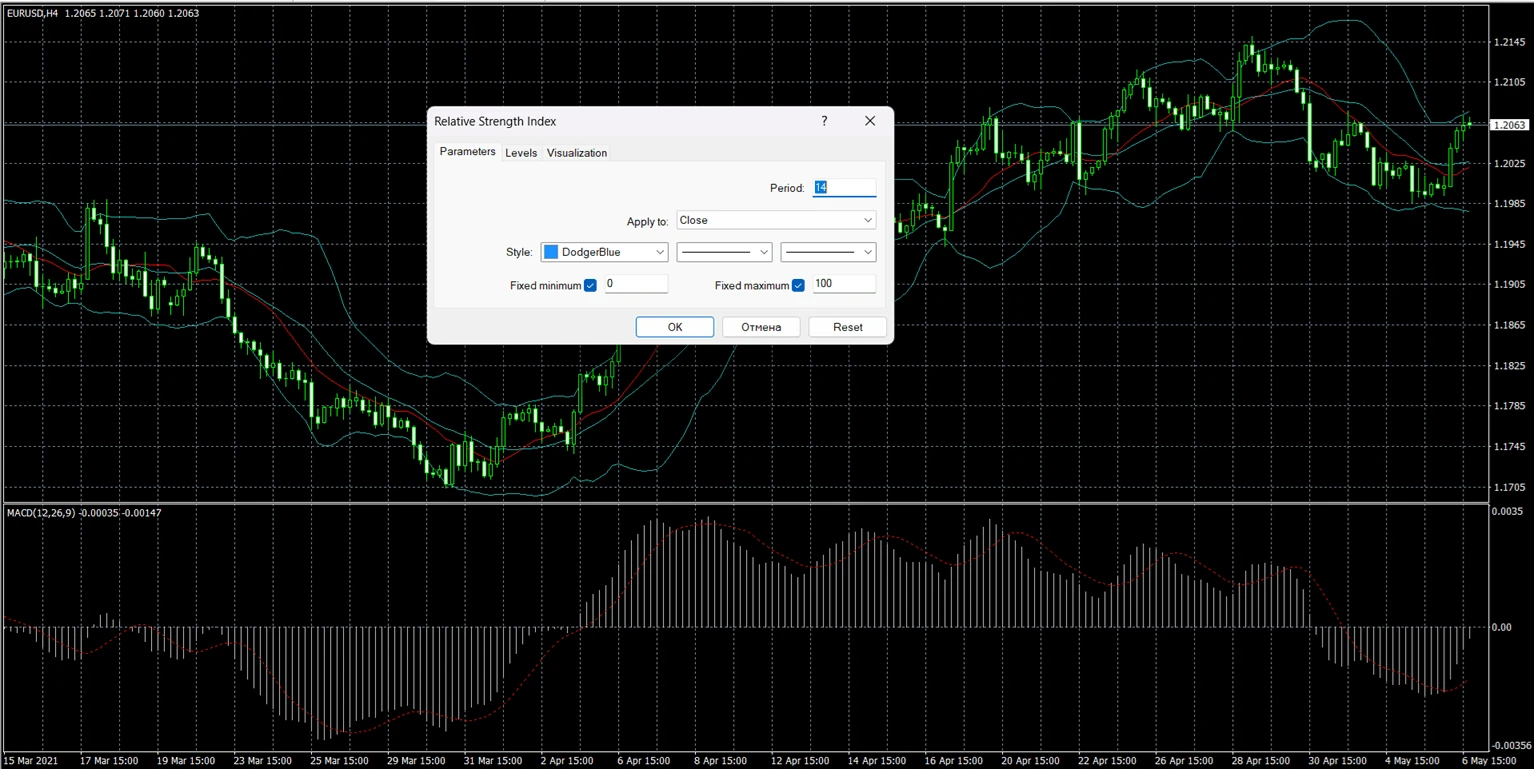
- RSI आमतौर पर 14-period setting का उपयोग करता है
- Moving Averages में अलग-अलग smoothing methods उपयोग हो सकती हैं
- Bollinger Bands अलग-अलग deviation values का उपयोग कर सकते हैं
Indicator settings edit करने के लिए:
- Chart पर indicator पर right-click करें।
- “Indicator Properties” चुनें।
- Parameters modify करें।
- “OK” पर क्लिक करें।
Settings customize करने से indicator market movements पर किस तरह प्रतिक्रिया देगा, यह बदल जाता है।
MT4 में indicator काम क्यों नहीं कर रहा?
MT4 indicator कई कारणों से काम करने में विफल हो सकता है, जिनमें installation issues, incompatible files, या platform refresh problems शामिल हैं।
Problem | Possible Reason | Solution |
Indicator missing from Navigator | File placed in wrong folder | Move file to MQL4 → Indicators |
Indicator does not appear on chart | MT4 not restarted | Restart platform or refresh Navigator |
Indicator shows errors | Incompatible or outdated file | Use MT4-compatible indicator version |
Indicator freezes MT4 | Corrupted custom indicator | Remove indicator and restart MT4 |
Indicator loads but shows nothing | Wrong settings or timeframe | Check parameters and chart timeframe |
Unofficial sources से डाउनलोड किए गए custom indicators में कभी-कभी coding errors या पुराने scripts हो सकते हैं, जो पुराने MT4 builds के लिए बनाए गए हों।
सबसे अधिक उपयोग किए जाने वाले MT4 indicators कौन से हैं?
कुछ indicators beginner और intermediate traders के बीच विशेष रूप से लोकप्रिय हैं क्योंकि वे व्यापक रूप से उपलब्ध हैं और समझने में अपेक्षाकृत आसान हैं।
Indicator | Main Purpose |
Moving Average | Trend direction |
RSI | Momentum and overbought/oversold analysis |
MACD | Trend and momentum confirmation |
Bollinger Bands | Volatility analysis |
Stochastic Oscillator | Momentum and reversal analysis |
ATR | Volatility measurement |
इन indicators को अक्सर price action analysis और risk management tools के साथ जोड़ा जाता है।
Built-in बनाम custom MT4 indicators
Feature | Built-in Indicators | Custom Indicators |
Installation | Already included | Manual installation required |
Examples | RSI, MACD, Bollinger Bands | Third-party or community tools |
Complexity | Beginner-friendly | Varies |
Updates | Included in MT4 | Depends on developer |
Availability | Standard in MT4 | Must be downloaded separately |
Practical MT4 example: EUR/USD chart में RSI जोड़ना
यह example दिखाता है कि MetaTrader 4 में EUR/USD chart पर Relative Strength Index (RSI) indicator कैसे जोड़ें।
- MetaTrader 4 खोलें।
- एक EUR/USD chart खोलें।
- “Insert” पर क्लिक करें।
- चुनें:
- Indicators → Oscillators → Relative Strength Index
- Default period को 14 रहने दें।
- “OK” पर क्लिक करें।
RSI indicator main chart के नीचे एक अलग window में दिखाई देगा।
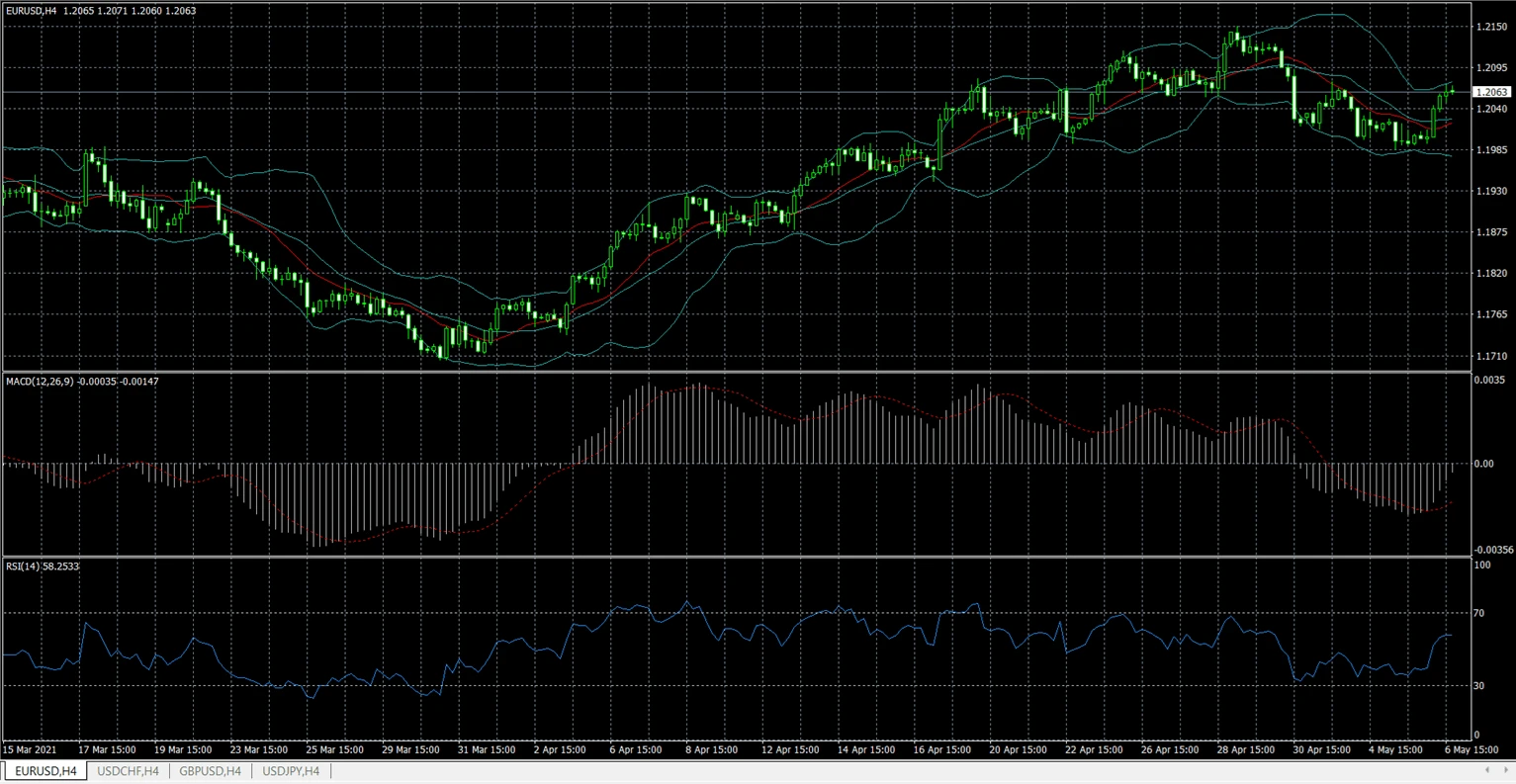
कई traders overbought और oversold conditions पहचानने के लिए RSI का उपयोग करते हैं, हालांकि indicator signals को हमेशा broader market analysis और risk management के साथ जोड़ा जाना चाहिए।
MT4 में indicators जोड़ते समय सामान्य गलतियाँ
Problem | Reason | How to Avoid |
Too many indicators on one chart | Overcomplicated analysis | Use only relevant tools |
Blindly using default settings | Strategy mismatch | Test settings carefully |
Ignoring timeframe differences | Indicators react differently on different charts | Match indicators to strategy timeframe |
Installing indicators from unknown sources | Risk of corrupted files | Use trusted sources |
Expecting guaranteed signals | Misunderstanding indicator limitations | Use indicators as support tools only |
Beginners को MT4 में indicators कैसे उपयोग करने चाहिए?
Beginners को आमतौर पर बहुत जटिल chart setups बनाने के बजाय थोड़े indicators से शुरुआत करने में लाभ होता है।
एक common beginner combination है:
- one trend indicator
- one momentum indicator
- basic support/resistance analysis
उदाहरण के लिए:
- Moving Average + RSI
- MACD + Bollinger Bands
कई अनुभवी traders अंततः अधिक indicators जोड़ने के बजाय अपने charts को सरल बना लेते हैं।
ऐसे heavy और cluttered charts से बचें!
MetaTrader 4 में indicators जोड़ने के बारे में FAQ
क्या MT4 indicators free हैं?
अधिकांश built-in MT4 indicators free होते हैं और platform के साथ शामिल होते हैं।
क्या आप MT4 में custom indicators जोड़ सकते हैं?
हाँ। MT4 MQL4 → Indicators folder के through manually installed custom indicators को support करता है।
मेरा indicator MT4 में क्यों नहीं दिख रहा?
सामान्य कारणों में शामिल हैं:
- गलत installation folder
- पुराना file format
- installation के बाद platform restart न करना
Indicators और Expert Advisors में क्या अंतर है?
Indicators charts का analysis करते हैं और जानकारी display करते हैं। Expert Advisors (EAs) automated trading programs होते हैं जो predefined rules के आधार पर trades execute कर सकते हैं।
क्या beginners MT4 में indicators उपयोग कर सकते हैं?
हाँ। कई MT4 indicators beginner-friendly होते हैं और trading education में आमतौर पर उपयोग किए जाते हैं।
सबसे लोकप्रिय MT4 indicator कौन सा है?
RSI, MACD, Moving Averages, और Bollinger Bands सबसे अधिक उपयोग किए जाने वाले indicators में शामिल हैं।
क्या indicators profitable trades की गारंटी देते हैं?
नहीं। Indicators analytical tools हैं और trading results की गारंटी नहीं देते।
क्या MT4 एक ही समय में multiple indicators चला सकता है?
हाँ। MT4 एक ही chart पर multiple indicators support करता है, हालांकि बहुत अधिक indicators एक साथ उपयोग करने से conflicting signals बन सकते हैं।
मुख्य निष्कर्ष
- MT4 indicators technical analysis tools हैं, जिनका उपयोग price action और market conditions का विश्लेषण करने के लिए किया जाता है।
- Built-in indicators Insert menu या Navigator window के through जोड़े जा सकते हैं।
- Custom indicators के लिए MQL4 → Indicators folder के अंदर manual installation आवश्यक है।
- MT4 built-in और third-party दोनों indicators को support करता है।
- Indicators को trading analysis में सहायता करनी चाहिए, risk management या decision-making का स्थान नहीं लेना चाहिए।
संदर्भ
Platform functionality और menu structure का संदर्भ official MetaTrader documentation से लिया गया है:
लेखक से मिलें
Vanessa Polson NordFX में marketing manager हैं और financial services industry में online marketing का बारह वर्षों से अधिक अनुभव रखती हैं। उन्होंने in-house environments में search, social, और display channels के across data-driven campaigns विकसित और निष्पादित किए हैं। उनका काम complex financial products और trading tools को स्पष्ट, व्यावहारिक educational content में बदलने पर केंद्रित है, जिससे उन्हें global trading landscape का व्यापक और संतुलित दृष्टिकोण मिला है।
Vanessa से LinkedIn पर जुड़ें।
वापस जाएं वापस जाएं