අවසන් යාවත්කාලීනය: 2026 ඔක්තෝබර්
කෙටි පිළිතුර:
MetaTrader 4 තුළ indicators එකතු කිරීමට, chart එකක් විවෘත කර, Insert → Indicators ක්ලික් කර, indicator category එක තෝරා, indicator එක select කර, අවශ්ය නම් settings සකස් කර, OK ක්ලික් කරන්න. Custom indicators MT4 data directory තුළ ඇති MQL4 → Indicators folder හරහා ස්ථාපනය කළ හැක.
MetaTrader 4 (MT4) තුළ indicators එකතු කිරීම platform එකේ “Insert” මෙනුව හෝ “Navigator” window හරහා සිදු කරයි. Traders හට RSI, MACD, Bollinger Bands, සහ Moving Averages වැනි built-in indicators කිහිප ක්ලික් වලින්ම chart එකකට යෙදිය හැක. MT4 custom indicators සඳහාද සහාය දක්වයි; ඒවා indicator files platform එකේ Indicators folder එකට copy කර terminal එක නැවත ආරම්භ කිරීමෙන් අතින් ස්ථාපනය කළ හැක.
MetaTrader 5 (MT5) තුළ MT4 වලට වඩා built-in indicators සහ analytical tools වැඩි ගණනක් ඇත, නමුත් එහි සරලභාවය සහ custom indicators සඳහා විශාල library එක නිසා MT4 තවමත් පුළුල් ලෙස භාවිතා වේ.
MetaTrader 4 හි indicators යනු කුමක්ද?
MetaTrader 4 හි indicators යනු price action, market trends, momentum, සහ volatility විශ්ලේෂණය කිරීමට භාවිතා කරන technical analysis tools වේ.
MT4 තුළ built-in indicators දහස් ගණනක් නොව දසි ගණනක් ඇත, සහ custom third-party indicators ද සහාය දක්වයි.
Indicators සාමාන්යයෙන් පෙන්වන්නේ:
- chart එක මතම (trend indicators)
- chart එකට පහළින් වෙනම window එකක (oscillators)
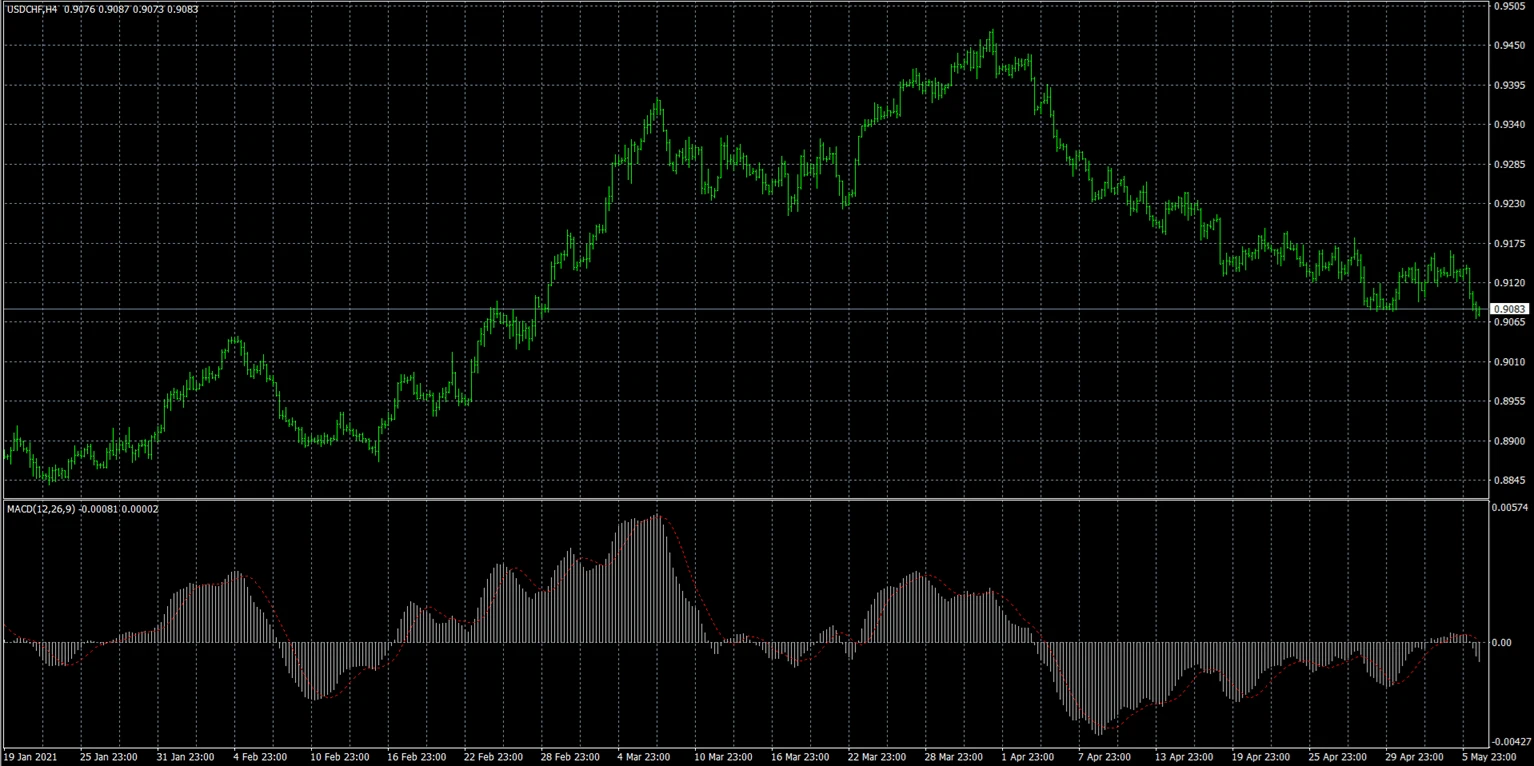
Built-in indicators
Built-in indicators already MT4 trading platform එක තුළ ඇතුළත් වේ.
උදාහරණ:
- Moving Average
- RSI
- MACD
- Bollinger Bands
- Stochastic Oscillator
- ATR
මෙම indicators අමතර files download නොකරම එකවර එකතු කළ හැක.
Custom indicators
Custom indicators යනු standard MT4 package එකෙන් පිට developer හෝ trader මඟින් නිර්මාණය කළ අතිරේක tools වේ.
ඒවා සාමාන්යයෙන් අතින් ස්ථාපනය කරන්නේ:
- .mq4 files
- .ex4 files
Custom indicators මඟින් පහත දේ ලබා දිය හැක:
- විශේෂ trading signals
- visual overlays
- advanced analytics
- විශේෂිත trading strategies
Traders MT4 තුළ indicators භාවිතා කරන්නේ ඇයි?
Traders MT4 තුළ indicators භාවිතා කරන්නේ:
- market trends හඳුනාගැනීමට
- momentum විශ්ලේෂණය කිරීමට
- volatility හඳුනාගැනීමට
- entry සහ exit තීරණ සඳහා සහාය වීමට
- trading setups තහවුරු කිරීමට
Indicators මඟින් market data දෘශ්ය ලෙස සංවිධානය කිරීමට උදව් වන අතර chart analysis සරල කළ හැක, විශේෂයෙන් ආරම්භකයින් සඳහා.
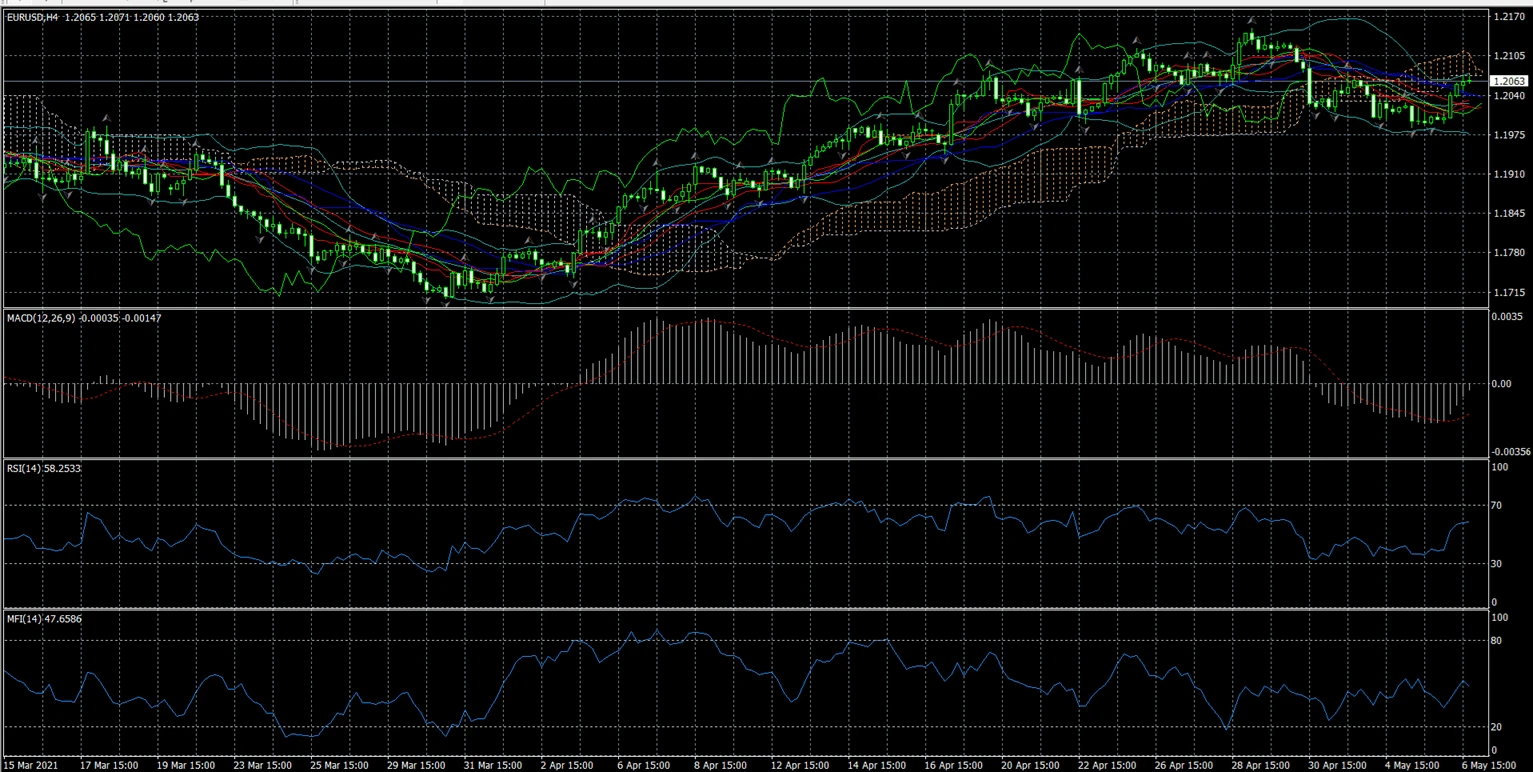
Observed MT4 trading behavior අනුව, බොහෝ beginner traders එකවර indicators වැඩි ගණනක් chart එක මත overload කරන බව පෙනේ; එමඟින් analysis දියුණු වීමට වඩා conflicting signals ඇති වීමට ඉඩ ඇත.
MetaTrader 4 තුළ built-in indicators එකතු කරන්නේ කෙසේද?
Built-in indicators MT4 interface එකෙන්ම කෙලින්ම එකතු කළ හැක.
සාමාන්ය ක්රම දෙකක් ඇත.
Method 1 — Insert menu භාවිතයෙන්
- MetaTrader 4 විවෘත කරන්න.
- Trading chart එකක් විවෘත කරන්න.
- Top menu එකේ “Insert” ක්ලික් කරන්න.
- “Indicators” තෝරන්න.
- Indicator category එකක් තෝරන්න:
- Trend
- Oscillators
- Volumes
- Bill Williams
- Indicator එක තෝරන්න.
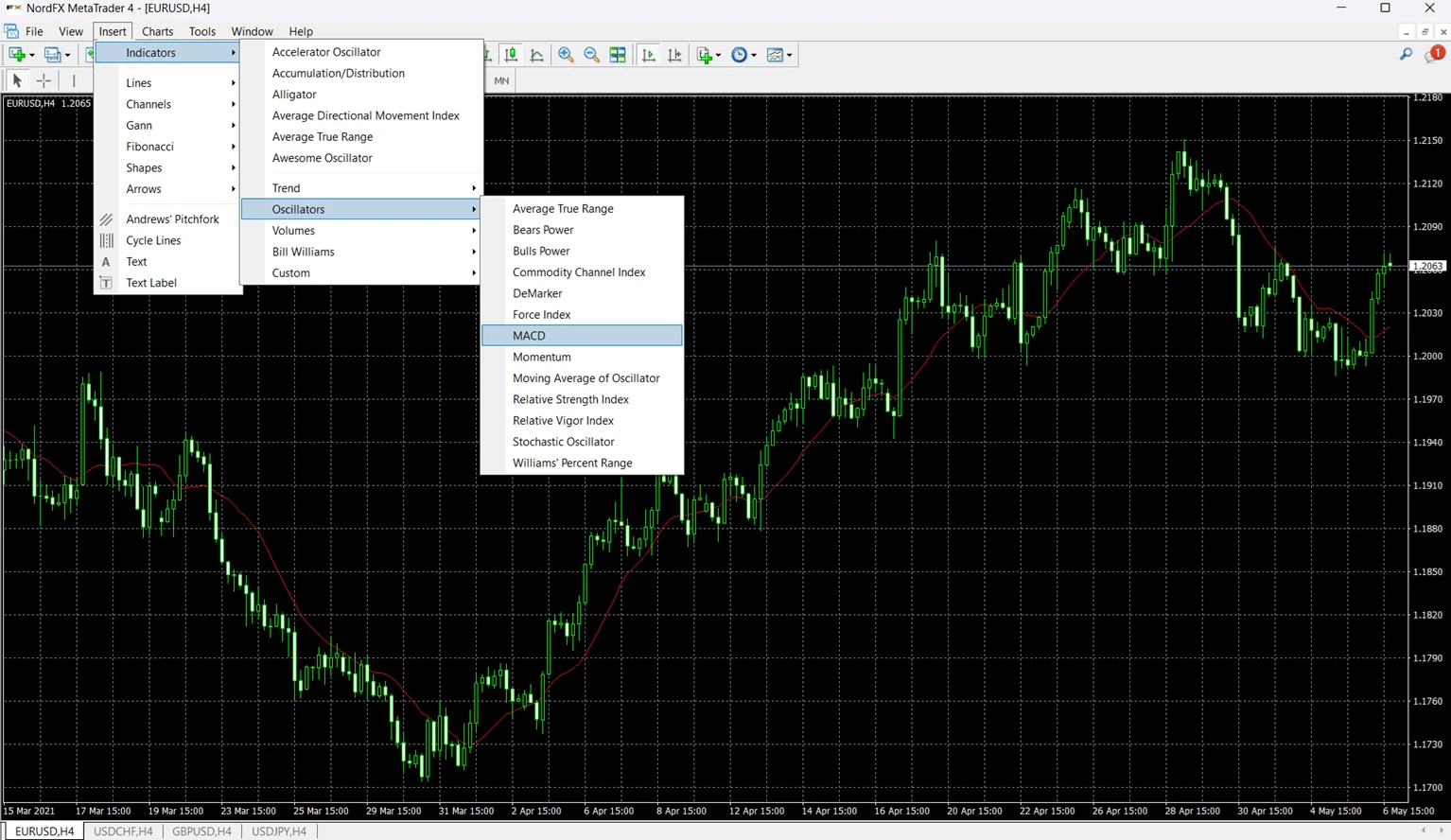
- අවශ්ය නම් settings සකස් කරන්න.
- “OK” ක්ලික් කරන්න.
Indicator එක වහාම chart එක මත දිස්වනු ඇත.
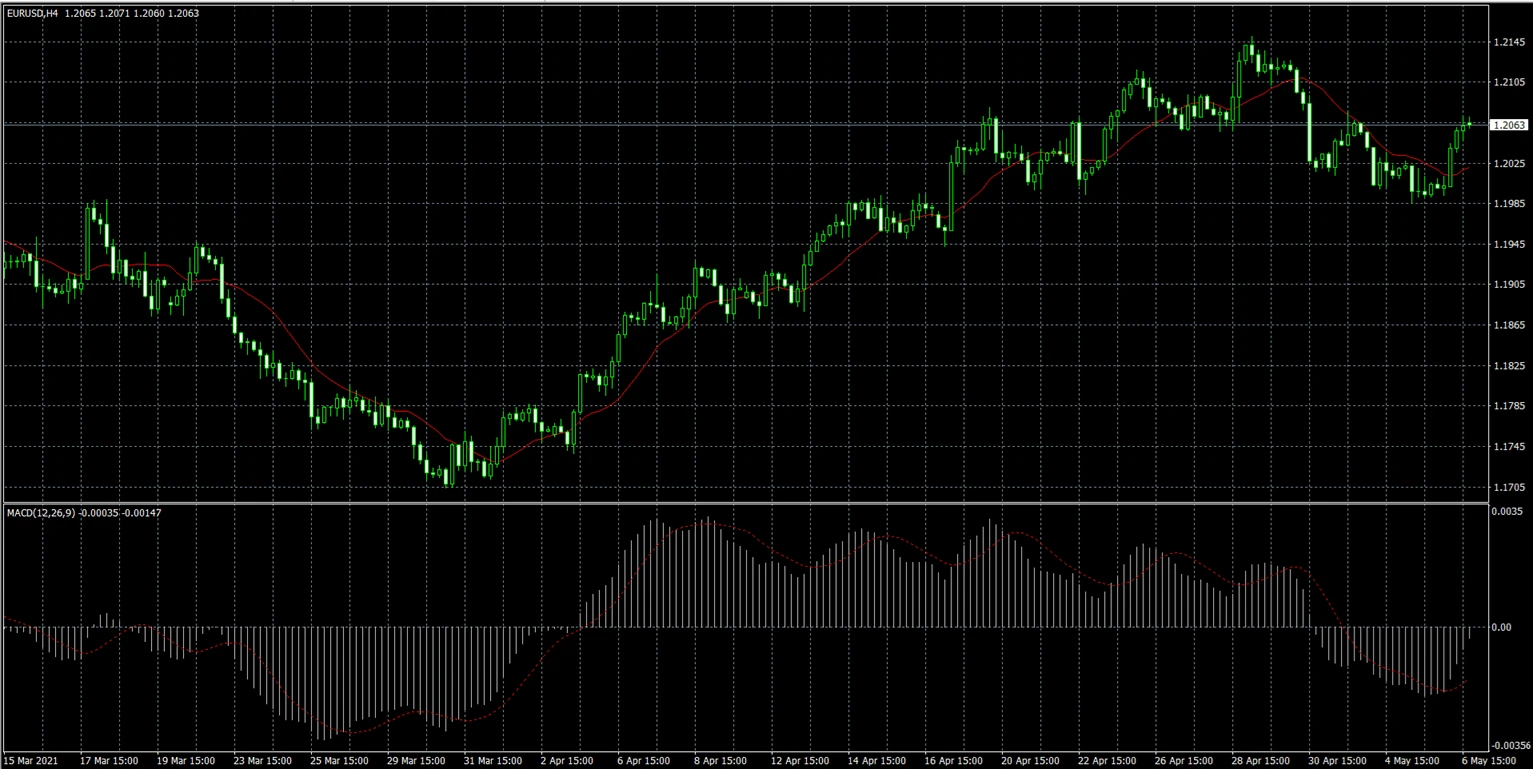
Method 2 — Navigator window භාවිතයෙන්
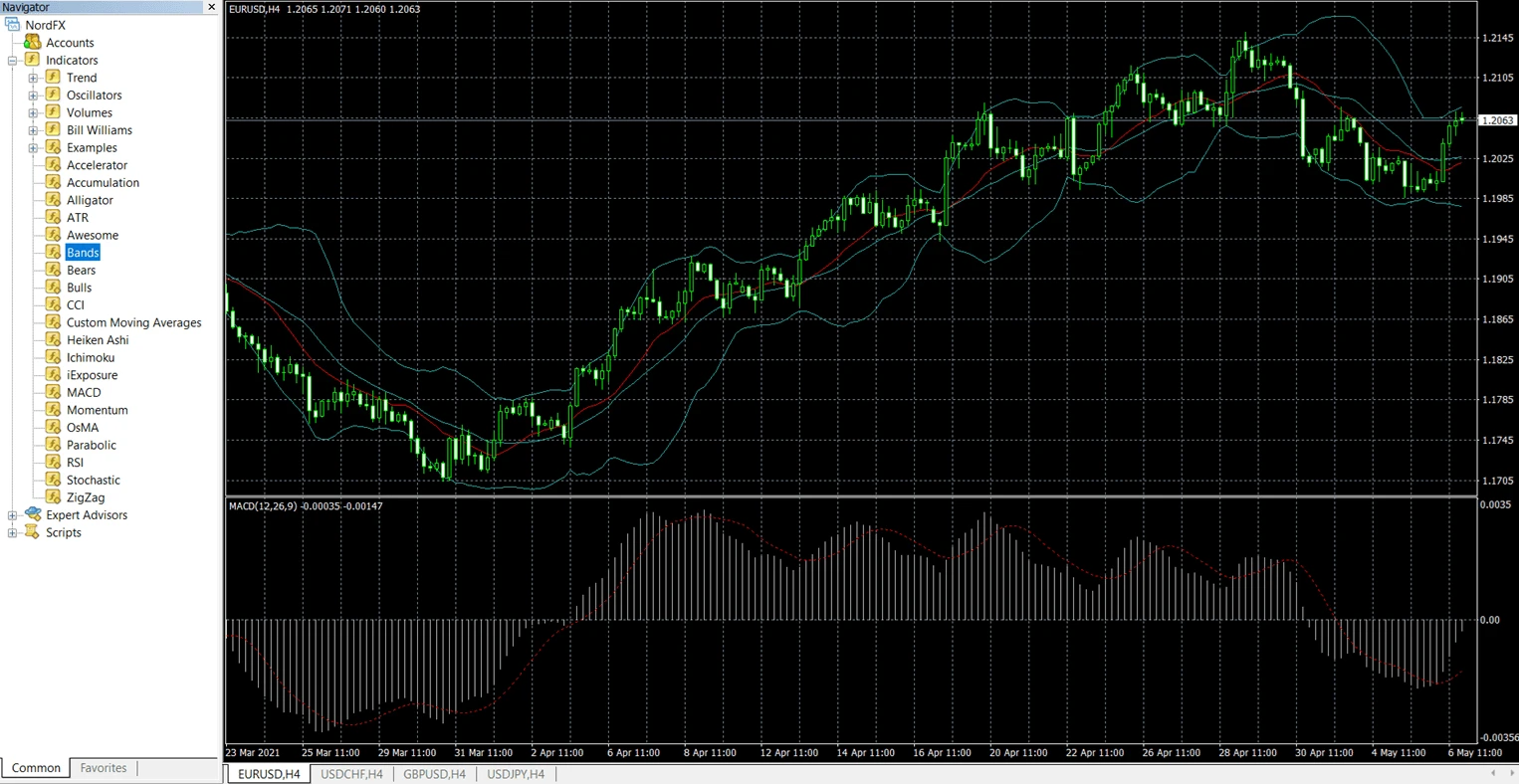
බොහෝ traders Navigator window එක භාවිතා කිරීමට කැමති වෙති, මන්ද charts අතර මාරු වන විට එය වේගවත්ය.
- “Navigator” panel එක විවෘත කරන්න (Ctrl+N).
- “Indicators” section එක විහිදුවන්න.
- Indicator එක chart එක මතට drag කරන්න.
- අවශ්ය නම් settings සකස් කරන්න.
- “OK” ක්ලික් කරන්න.
Indicator එක වහාම පෙනෙනු ඇත.
MT4 custom indicators භාවිතා කරන්නේ කුමන file formats ද?
බොහෝ custom MT4 indicators පහත file formats එකක් භාවිතා කරයි:
File Format | අර්ථය |
.mq4 | සංස්කරණය කළ හැකි MetaQuotes source code file |
.ex4 | Compiled executable MT4 indicator file |
.mq4 format එක MetaEditor තුළ සංශෝධනය කළ හැකි අතර, .ex4 files දැනටමත් compiled වන අතර සාමාන්යයෙන් සෘජුව edit කළ නොහැක.
Custom indicator එකක් ස්ථාපනය කරන විට, traders සාමාන්යයෙන් .mq4 හෝ .ex4 file එක MT4 Indicators folder එකට copy කරති.
MT4 තුළ custom indicators ස්ථාපනය කරන්නේ කෙසේද?
Custom indicators සඳහා MT4 data directory තුළ අතින් ස්ථාපනය කිරීම අවශ්ය වේ.
Indicators folder එක සොයා ගන්නේ කොහේද?
- MT4 විවෘත කරන්න.
- “File” ක්ලික් කරන්න.
- “Open Data Folder” තෝරන්න.
- විවෘත කරන්න:
- MQL4
- Indicators
Custom indicator file එක මෙම folder එකට copy කරන්න.
ස්ථාපනයෙන් පසු MT4 නැවත ආරම්භ කරන්නේ කෙසේද?
File එක copy කළ පසු:
- MetaTrader 4 නැවත ආරම්භ කරන්න.
- Navigator panel එක විවෘත කරන්න.
- “Indicators” විහිදුවන්න.
- List එක තුළ custom indicator එක සොයන්න.
Indicator එක වහාම නොපෙනේ නම්, Navigator window එක තුළ right-click කර “Refresh” තෝරන්න.
MT4 තුළ indicator settings customize කරන්නේ කෙසේද?
බොහෝ MT4 indicators traders හට පහත settings වෙනස් කිරීමට ඉඩ දෙයි:
- calculation period
- colors
- line thickness
- levels
- visualization style
උදාහරණයක් ලෙස:
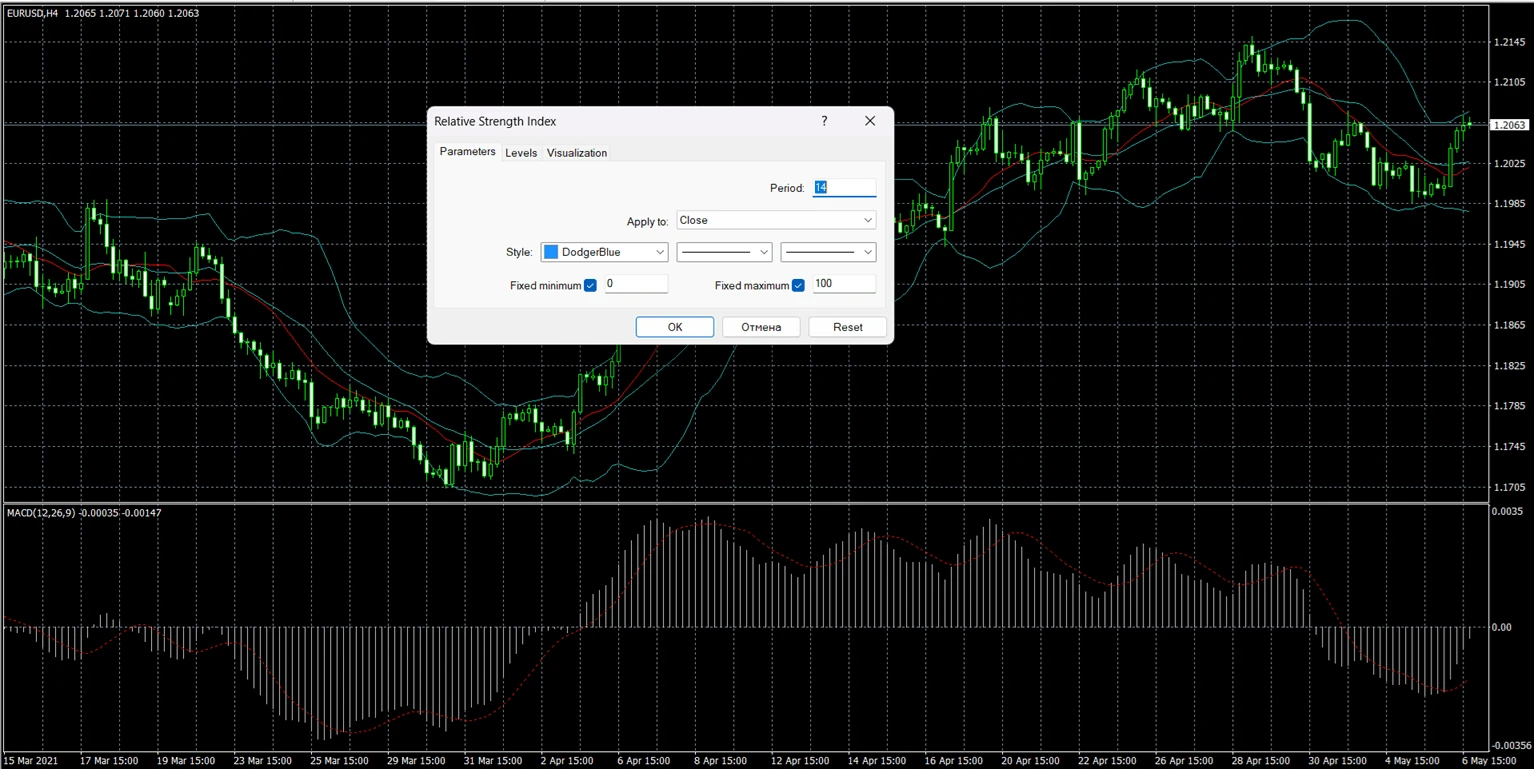
- RSI සාමාන්යයෙන් 14-period setting එකක් භාවිතා කරයි
- Moving Averages විවිධ smoothing methods භාවිතා කළ හැක
- Bollinger Bands විවිධ deviation values භාවිතා කළ හැක
Indicator settings සංස්කරණය කිරීමට:
- Chart එකේ indicator එක මත right-click කරන්න.
- “Indicator Properties” තෝරන්න.
- Parameters වෙනස් කරන්න.
- “OK” ක්ලික් කරන්න.
Settings customize කිරීම මඟින් indicator එක market movements වලට ප්රතිචාර දක්වන ආකාරය වෙනස් වේ.
MT4 තුළ indicator එකක් වැඩ නොකරන්නේ ඇයි?
Installation issues, incompatible files, හෝ platform refresh problems ඇතුළු හේතු කිහිපයක් නිසා MT4 indicator එකක් ක්රියා නොකරනවා විය හැක.
Problem | Possible Reason | Solution |
Navigator තුළ indicator එක නොමැත | File එක වැරදි folder එකට දමා ඇත | File එක MQL4 → Indicators වෙත ගෙන යන්න |
Indicator එක chart එක මත නොපෙන්වයි | MT4 නැවත ආරම්භ කර නැත | Platform එක නැවත ආරම්භ කරන්න හෝ Navigator refresh කරන්න |
Indicator එක errors පෙන්වයි | නොගැළපෙන හෝ පැරණි file එක | MT4-අනුකූල indicator version එක භාවිතා කරන්න |
Indicator එක MT4 freeze කරයි | Corrupted custom indicator එක | Indicator එක ඉවත් කර MT4 නැවත ආරම්භ කරන්න |
Indicator එක load වුවද කිසිවක් නොපෙන්වයි | වැරදි settings හෝ timeframe | Parameters සහ chart timeframe පරීක්ෂා කරන්න |
Unofficial sources වලින් download කරන custom indicators තුළ සමහර විට coding errors හෝ පැරණි MT4 builds සඳහා නිර්මාණය කළ outdated scripts තිබිය හැක.
MT4 තුළ වැඩිම භාවිතා වන indicators මොනවාද?
සමහර indicators beginner සහ intermediate traders අතර විශේෂයෙන් ජනප්රිය වන්නේ ඒවා පුළුල් ලෙස ලබාගත හැකි සහ සාපේක්ෂව තේරුම් ගැනීමට පහසු නිසාය.
Indicator | Main Purpose |
Moving Average | Trend direction |
RSI | Momentum සහ overbought/oversold විශ්ලේෂණය |
MACD | Trend සහ momentum තහවුරු කිරීම |
Bollinger Bands | Volatility විශ්ලේෂණය |
Stochastic Oscillator | Momentum සහ reversal විශ්ලේෂණය |
ATR | Volatility මැනීම |
මෙම indicators බොහෝවිට price action analysis සහ risk management tools සමඟ ඒකාබද්ධ කර භාවිතා කරයි.
Built-in vs custom MT4 indicators
Feature | Built-in Indicators | Custom Indicators |
Installation | Already included | Manual installation required |
Examples | RSI, MACD, Bollinger Bands | Third-party or community tools |
Complexity | Beginner-friendly | Varies |
Updates | Included in MT4 | Depends on developer |
Availability | Standard in MT4 | Must be downloaded separately |
ප්රායෝගික MT4 උදාහරණය: EUR/USD chart එකකට RSI එකතු කිරීම
මෙම උදාහරණය MetaTrader 4 තුළ EUR/USD chart එකකට Relative Strength Index (RSI) indicator එක එකතු කරන ආකාරය පෙන්වයි.
- MetaTrader 4 විවෘත කරන්න.
- EUR/USD chart එකක් විවෘත කරන්න.
- “Insert” ක්ලික් කරන්න.
- තෝරන්න:
- Indicators → Oscillators → Relative Strength Index
- Default period එක 14 ලෙසම තබන්න.
- “OK” ක්ලික් කරන්න.
RSI indicator එක main chart එකට පහළින් වෙනම window එකක දිස්වනු ඇත.
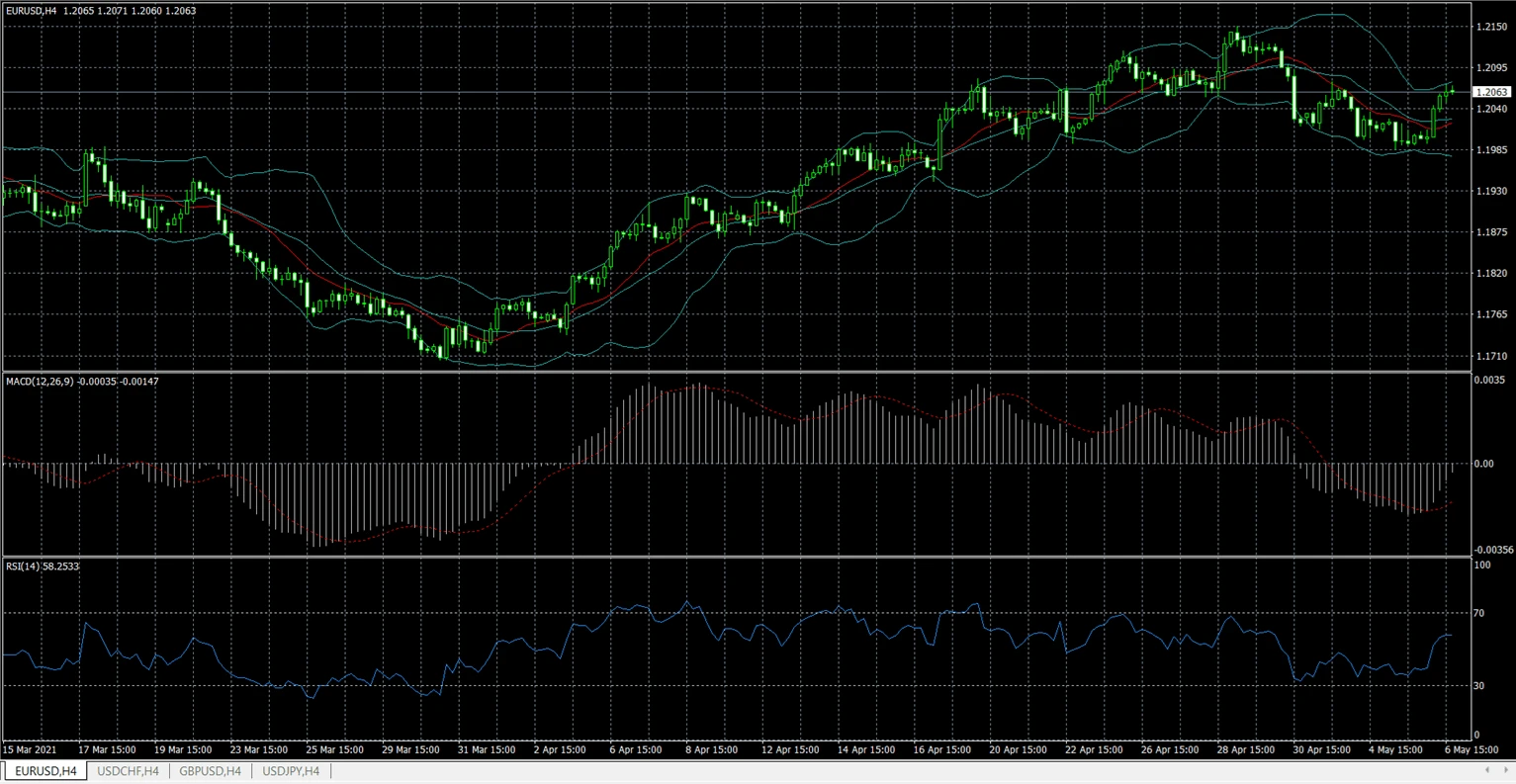
බොහෝ traders overbought සහ oversold තත්ත්ව හඳුනාගැනීමට RSI භාවිතා කරයි, නමුත් indicator signals නිතරම පුළුල් market analysis සහ risk management සමඟ එක්කර භාවිතා කළ යුතුය.
MT4 තුළ indicators එකතු කිරීමේදී සාමාන්ය වැරදි
Problem | Reason | How to Avoid |
එක chart එකක indicators වැඩි ගණනක් | ඉතා සංකීර්ණ analysis | අදාළ tools පමණක් භාවිතා කරන්න |
Default settings අන්ධව භාවිතා කිරීම | Strategy mismatch | Settings හොඳින් test කරන්න |
Timeframe වෙනස්කම් නොසලකා හැරීම | Indicators වෙනත් charts වලදී වෙනස් ලෙස ප්රතිචාර දක්වයි | Indicators strategy timeframe එකට ගැළපෙන්න |
Unknown sources වලින් indicators ස්ථාපනය කිරීම | Corrupted files අවදානම | විශ්වාසදායක sources භාවිතා කරන්න |
Guaranteed signals බලාපොරොත්තු වීම | Indicator limits වැරදි ලෙස තේරුම් ගැනීම | Indicators සහාය tools ලෙස පමණක් භාවිතා කරන්න |
ආරම්භකයින් MT4 තුළ indicators භාවිතා කළ යුත්තේ කෙසේද?
ආරම්භකයින්ට සාමාන්යයෙන් ඉතා සංකීර්ණ chart setups ගොඩනැගීමට වඩා indicators කිහිපයක් සමඟ ආරම්භ කිරීමෙන් ප්රයෝජන ලැබේ.
සාමාන්ය beginner සංයෝජනයක් වන්නේ:
- trend indicator එකක්
- momentum indicator එකක්
- මූලික support/resistance විශ්ලේෂණය
උදාහරණයක් ලෙස:
- Moving Average + RSI
- MACD + Bollinger Bands
බොහෝ පළපුරුදු traders අවසානයේ chart එක සරල කරති, indicators වැඩි කිරීම වෙනුවට.
මෙවැනි බර සහ අවුල් chart වලින් වළකින්න!
MetaTrader 4 තුළ Indicators එකතු කරන ආකාරය පිළිබඳ FAQ
MT4 indicators නොමිලේද?
බොහෝ built-in MT4 indicators නොමිලේ වන අතර platform එක සමඟ ඇතුළත් වේ.
MT4 වෙත custom indicators එකතු කළ හැකිද?
ඔව්. MT4 මඟින් MQL4 → Indicators folder හරහා අතින් ස්ථාපනය කරන custom indicators සඳහා සහාය ඇත.
මගේ indicator එක MT4 තුළ නොපෙන්වන්නේ ඇයි?
සාමාන්ය හේතු වන්නේ:
- වැරදි installation folder
- පැරණි file format
- ස්ථාපනයෙන් පසු platform එක නැවත ආරම්භ කර නොමැතිවීම
Indicators සහ Expert Advisors අතර වෙනස කුමක්ද?
Indicators charts විශ්ලේෂණය කර තොරතුරු පෙන්වයි. Expert Advisors (EAs) යනු පෙරනිමිත නීති මත trades ක්රියාත්මක කළ හැකි automated trading programs වේ.
ආරම්භකයින්ට MT4 තුළ indicators භාවිතා කළ හැකිද?
ඔව්. බොහෝ MT4 indicators beginner-friendly වන අතර trading education තුළ සාමාන්යයෙන් භාවිතා වේ.
වැඩිම ජනප්රිය MT4 indicator එක කුමක්ද?
RSI, MACD, Moving Averages, සහ Bollinger Bands යනු වැඩිම භාවිතා වන indicators අතර වේ.
Indicators මඟින් ලාභදායී trades සහතික කරන්නේද?
නැත. Indicators යනු analytical tools වන අතර trading results සහතික නොකරයි.
MT4 එකවර indicators කිහිපයක් ධාවනය කළ හැකිද?
ඔව්. MT4 එකම chart එක මත indicators කිහිපයක් සඳහා සහාය දක්වයි, නමුත් එකවර වැඩි ගණනක් භාවිතා කිරීම conflicting signals ඇති කළ හැක.
ප්රධාන takeaways
- MT4 indicators යනු price action සහ market conditions විශ්ලේෂණය කිරීමට භාවිතා වන technical analysis tools වේ.
- Built-in indicators Insert menu හෝ Navigator window හරහා එකතු කළ හැක.
- Custom indicators සඳහා MQL4 → Indicators folder තුළ අතින් ස්ථාපනය අවශ්ය වේ.
- MT4 built-in සහ third-party indicators දෙකම සහාය දක්වයි.
- Indicators trading analysis සඳහා සහාය විය යුතුය; risk management හෝ decision-making වෙනුවට ඒවා භාවිතා නොකළ යුතුය.
Reference
Platform functionality සහ menu structure official MetaTrader documentation වලින් උපුටා ගෙන ඇත:
කර්තෘ හඳුන්වාදීම
Vanessa Polson යනු NordFX හි marketing manager කෙනෙකි; financial services industry තුළ online marketing පිළිබඳ වසර දොළහකට අධික පළපුරුද්දක් ඇයට ඇත. In-house environments තුළ search, social, සහ display channels පුරා data-driven campaigns ඇය විසින් සංවර්ධනය කර ක්රියාත්මක කර ඇත. ඇගේ වැඩ කටයුතු සංකීර්ණ financial products සහ trading tools පැහැදිලි, ප්රායෝගික අධ්යාපනික අන්තර්ගතයක් බවට පරිවර්තනය කිරීම කෙරෙහි අවධානය යොමු කරයි; එමඟින් ඇයට global trading landscape පිළිබඳ පුළුල් හා සමබර දැක්මක් ලැබී ඇත.
Vanessa සමඟ LinkedIn හි සම්බන්ධ වන්න.
ආපසු යන්න ආපසු යන්න