Which trading platforms are best for day traders?
MetaTrader 5, MetaTrader 4, cTrader, TradingView, and NinjaTrader are among the best trading platforms for day traders, but the right choice depends on the market and trading style. MetaTrader 5 suits multi-asset CFD trading, MetaTrader 4 remains practical for forex, cTrader offers modern execution and automation tools, TradingView is strong for charting and analysis, and NinjaTrader is best suited to active futures trading. The most suitable platform should provide reliable order entry, real-time data, responsive charts, risk controls, and a workflow that matches the trader’s experience level.
Key takeaways:
- MetaTrader 5 offers a broad balance of charting, automation, order types, and multi-asset support.
- MetaTrader 4 remains relevant for traders who mainly focus on forex and use established Expert Advisors.
- cTrader is a strong fit for traders who want a modern interface, chart trading, market-depth tools, and algorithmic development.
- TradingView is particularly useful for browser-based charting, market analysis, strategy testing, and access across devices.
- NinjaTrader is designed mainly for futures traders who need advanced order entry, replay, strategy testing, and depth-of-market workflows.
The best day trading platforms overview
The best trading platforms for day trading are not simply the platforms with the longest feature lists. Their value depends on how well their tools match a specific trading process.
A forex scalper may need one-click chart trading and tight control over stop-loss placement. A CFD trader may want access to several asset classes from one account. A technical analyst may prefer a large indicator library and synchronized charts. A systematic day trader may care more about programming languages, backtesting quality, and historical data.
The following comparison focuses only on MetaTrader 5, MetaTrader 4, cTrader, TradingView, and NinjaTrader.
Platform | Main market fit | Device availability | Automation | Pricing logic | Best suited to |
MetaTrader 5 | Currencies, crypto, commodities, CFDs, stocks and futures where supported | Desktop, web and mobile | MQL5 Expert Advisors and indicators | Usually provided by a broker for free | Traders wanting a flexible multi-asset terminal |
MetaTrader 4 | Primarily currencies and CFDs | Desktop and mobile | MQL4 Expert Advisors and indicators | Usually available through a broker; third-party tools may cost extra | Forex traders using established MT4 tools |
cTrader | Forex and CFDs | Desktop, web and mobile | C# and Python-based cBots, indicators and plugins | Commonly broker-provided; optional paid tools may be available | Manual and algorithmic traders wanting a modern interface |
TradingView | Broad market analysis with broker-dependent execution | Web, desktop and mobile | Pine Script strategies and indicators | Free and paid subscription tiers; brokerage costs are separate | Chart-focused traders and strategy researchers |
NinjaTrader | Futures, with other markets depending on connection | Desktop, web and mobile | NinjaScript, Strategy Builder and testing tools | Platform, data, brokerage and commission costs vary by setup | Active futures traders needing advanced execution tools |
MetaTrader 5
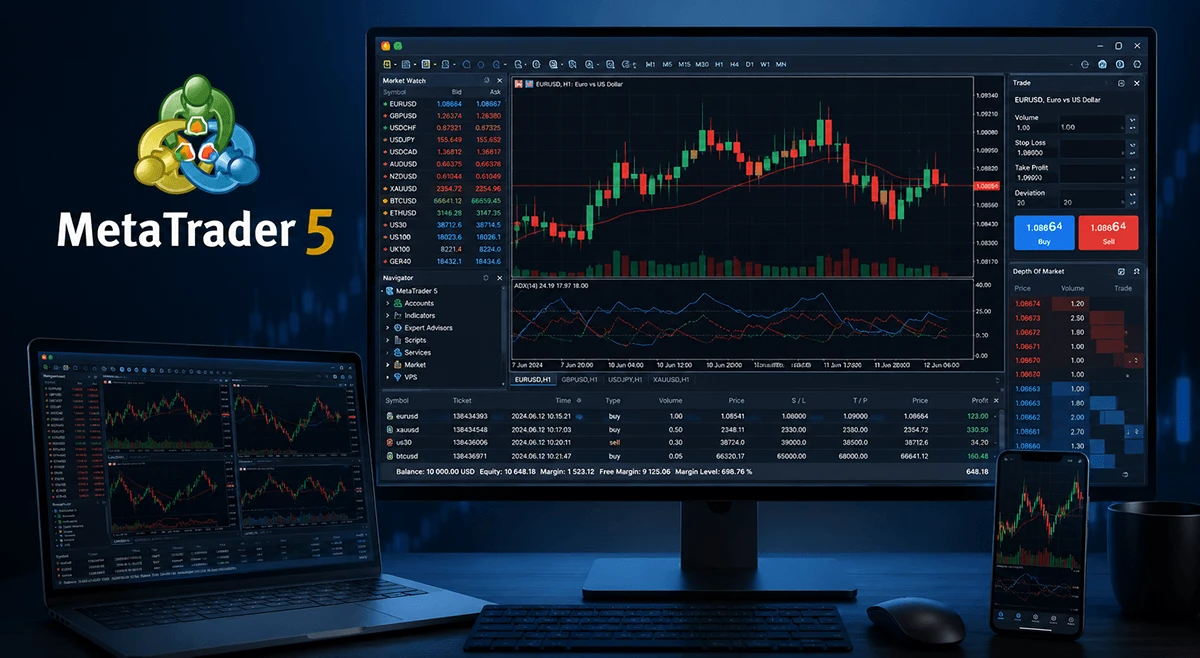
MetaTrader 5, commonly called MT5, is the most popular multi-asset trading platform designed for manual and automated trading. It supports market, limit, stop, and stop-limit orders, although the available instruments and execution conditions depend on the connected broker.
Its charts include multiple timeframes, technical indicators, drawing tools, templates, and multi-chart layouts. Traders can place orders from charts, monitor positions, set stop-loss and take-profit levels, and use Expert Advisors for automated trading.
MT5 is often suitable for traders who want to access currencies, gold trading, indices, commodities, shares, or cryptocurrency CFDs from one environment, subject to the broker’s product range. Its MQL5 programming language also supports custom indicators, scripts, trading robots, and strategy testing.
The platform is a good fit for traders who want a complete multi-asset trading terminal with automation and testing tools. It may be less suitable for traders who prioritize exchange-level futures order flow or a browser-first research environment.
Pros
- Supports multi-asset trading where provided by the broker.
- Offers advanced order types, multiple timeframes, and integrated strategy testing.
- Uses MQL5 for automated systems and custom indicators.
- Is commonly available without a separate platform subscription.
Cons
- The interface may initially feel dense to a new trader.
- Broker implementations can differ in symbols, execution, price history, and account features.
- Existing MT4 tools are not automatically compatible with MT5.
- It is not designed primarily around exchange-style order-flow analysis.
MetaTrader 4
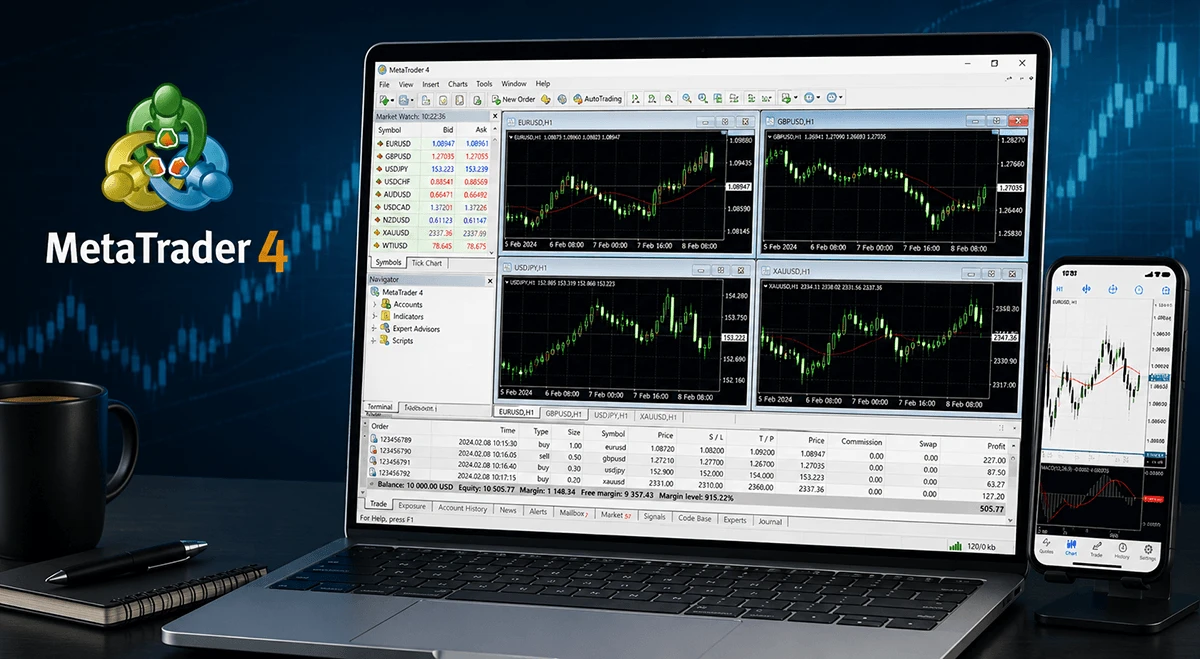
MetaTrader 4, or MT4, is the earlier MetaTrader platform and remains widely used for forex and CFD trading. Its interface is relatively compact, with familiar components such as the Market Watch panel, Navigator, chart windows, order tickets, and terminal tabs.
MT4 supports custom indicators, scripts, and Expert Advisors written in MQL4. Its long history has created a large ecosystem of third-party tools, although traders should evaluate external software carefully before installing or using it.
MT4 is most suitable for traders who focus on forex, prefer a familiar workflow, or depend on an existing MT4 indicator or Expert Advisor. It is less suitable for traders seeking a newer multi-asset architecture, broader order management, or tools designed for centralized futures markets.
Choosing between MT4 and MT5 is not simply a matter of selecting the newer platform. Traders should first check which instruments, account types, automated systems, and data services are supported by their broker.
Pros
- Provides a familiar interface for many forex traders.
- Has a large ecosystem of Expert Advisors, scripts, and indicators.
- Requires fewer system resources than many advanced professional platforms.
- Is commonly supported by forex and CFD brokers.
Cons
- Uses an older architecture than MT5.
- Is mainly associated with forex and CFDs rather than broad multi-asset trading.
- Offers fewer native order and testing capabilities than newer platforms.
- Third-party tools can vary significantly in quality and security.
cTrader
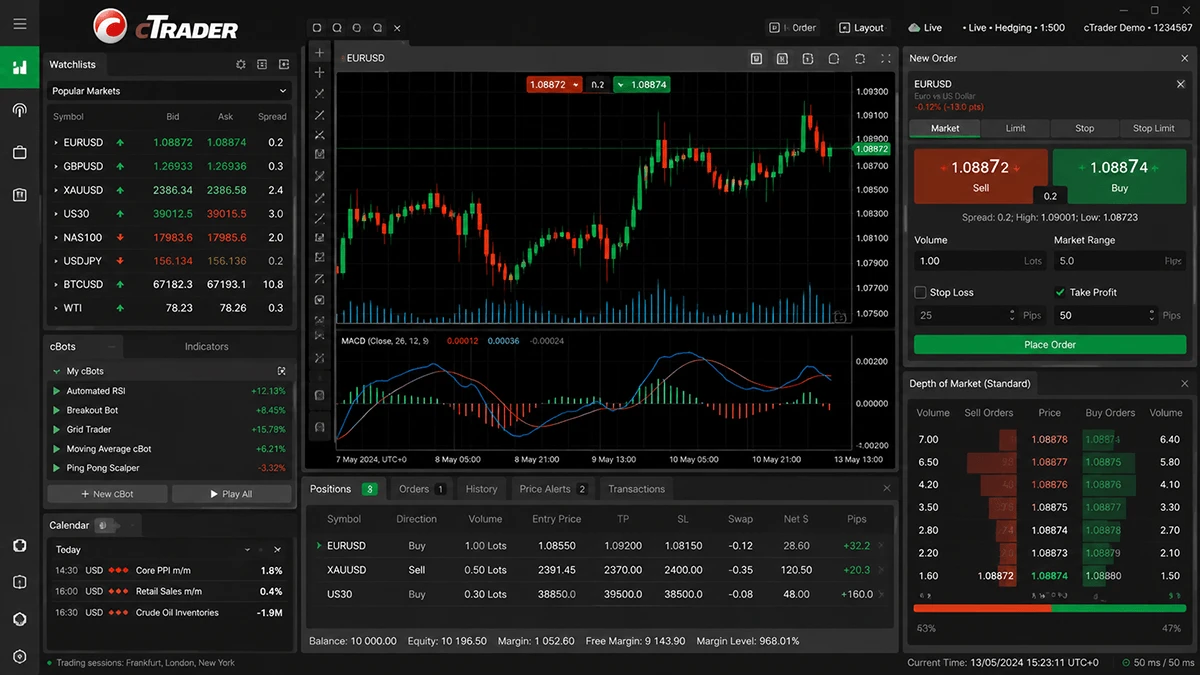
cTrader is a multi-device trading platform that is strongest in forex and CFDs. It combines charting, order entry, depth-of-market displays, algorithmic trading, backtesting, optimization, and market replay within one ecosystem.
Its interface is more visual than many traditional desktop terminals. Traders can place and adjust orders directly from charts, view market depth, create watchlists, build custom workspaces, and use several order types. Execution quality, liquidity, instrument coverage, and trading costs still depend on the connected broker.
cTrader supports algorithmic development through C# and Python for cBots, indicators, and plugins.
The platform is a good fit for forex and CFD traders who value modern chart trading and a consistent desktop, web, and mobile experience. It may not be the first choice for traders whose main activity is exchange-traded futures or complex options trading.
Pros
- Offers a modern interface with chart-based trading and depth-of-market tools.
- Is available across desktop, web, and mobile devices.
- Supports C# and Python-based automation.
- Includes backtesting, optimization, replay, and demo functionality.
Cons
- Instrument availability depends on the connected broker.
- Is less suitable for futures-first or options-first workflows.
- Some advanced features require technical knowledge.
- Liquidity and execution quality cannot be judged from the platform alone.
TradingView
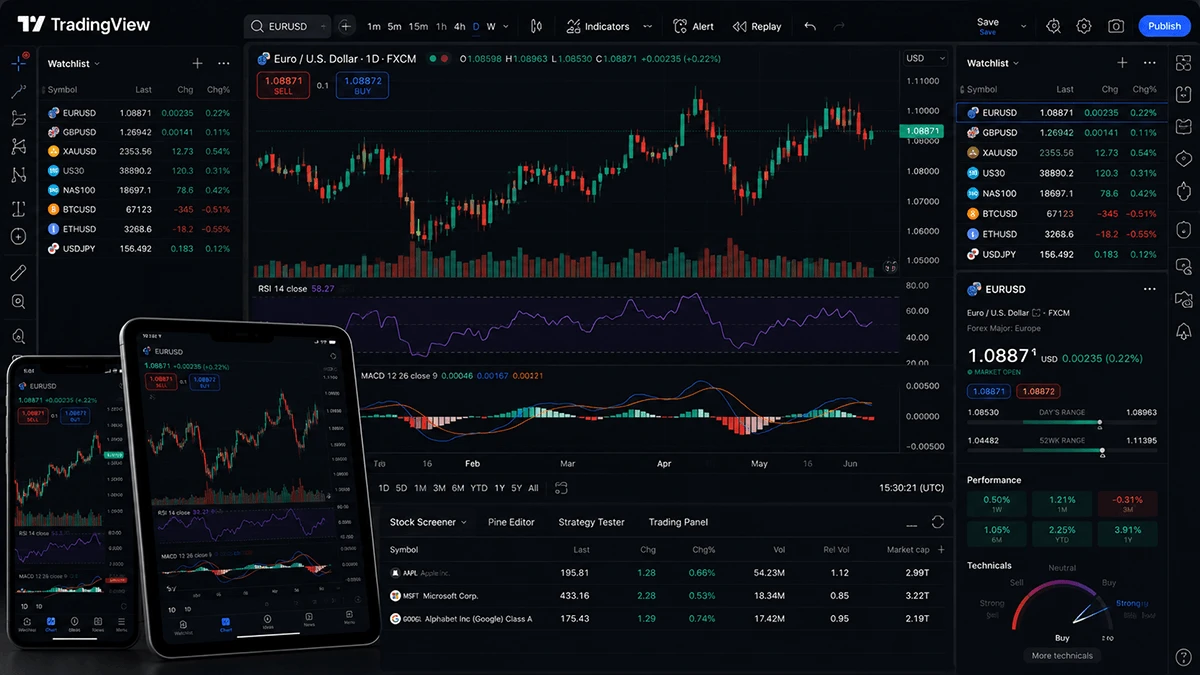
TradingView is primarily a charting, analysis, screening, and strategy-development environment. It runs in a browser and is also available through desktop and mobile applications, making it convenient for traders who move between devices.
Its main strengths include chart design, drawing tools, technical indicators, alerts, screeners, watchlists, community-created scripts, and Pine Script. Traders can use paper trading or connect a supported broker, but the available instruments, order types, and execution behavior depend on the selected integration.
TradingView is well suited to traders who spend significant time analyzing several markets, comparing instruments, creating alerts, and testing trading ideas. It can also be accessible for beginners because its chart interface is visual and relatively easy to explore.
However, it may not suit a day trader who requires advanced depth-of-market execution, complex multi-account management, or highly specialized futures order routing. It should be evaluated separately as a charting platform and as an execution interface because the two functions may have different limitations.
Pros
- Is accessible through a browser, desktop application, and mobile app.
- Provides strong charting, drawing, alert, and market-analysis tools.
- Has a large indicator and public-script ecosystem.
- Uses Pine Script, which makes strategy prototyping relatively approachable.
Cons
- Live order features depend on the connected broker.
- Subscription tiers can limit charts, alerts, indicators, and historical data.
- It is not the deepest execution interface for high-speed discretionary trading.
- Community scripts require careful evaluation before use.
NinjaTrader
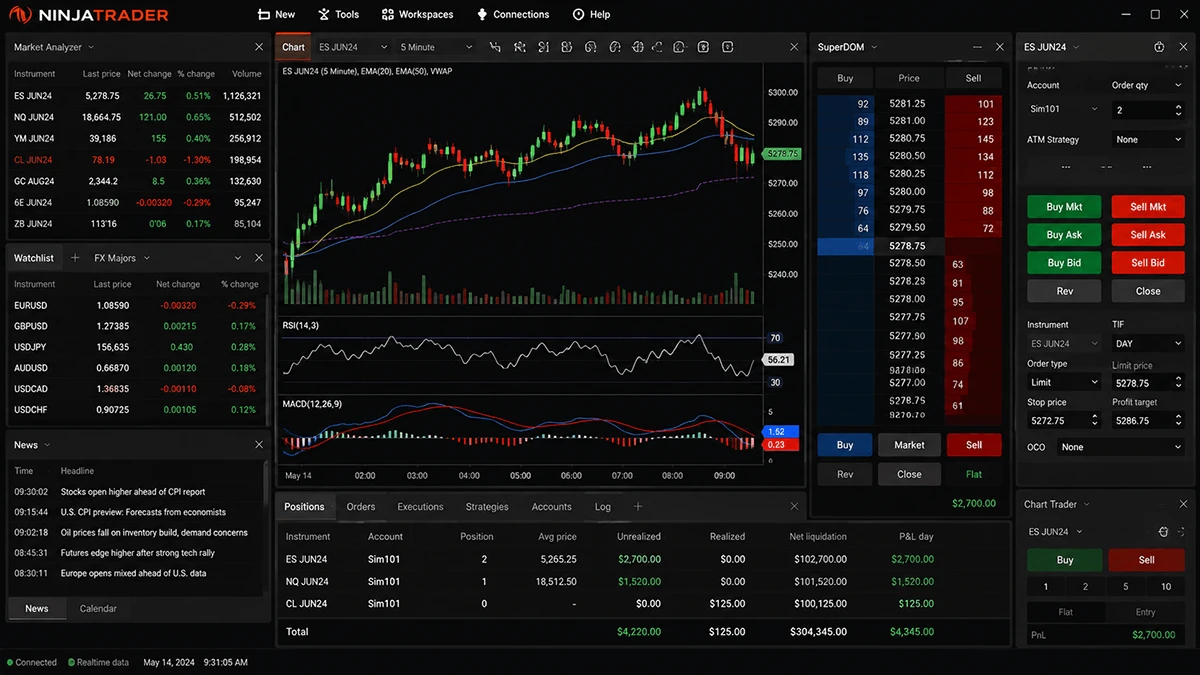
NinjaTrader is a futures-focused trading platform with advanced charting, depth-of-market tools, order management, simulation, replay, and strategy development. Its desktop environment is particularly relevant to active futures traders who use Chart Trader, SuperDOM, bracket orders, and automated trade management.
NinjaTrader supports technical indicators, custom workspaces, strategy testing, walk-forward analysis, and NinjaScript development in a C#-based environment. Traders who do not code can use Strategy Builder to create rule-based systems.
Replay is one of its most practical tools. It allows traders to practice historical market sessions and test order-entry routines without waiting for similar conditions to appear in real time.
NinjaTrader is a strong fit for traders who focus on futures and are prepared to learn a detailed platform. It is usually not the simplest starting point for beginners who only want to trade a small selection of forex or CFD instruments.
Pros
- Provides a strong futures order-entry and depth-of-market environment.
- Supports bracket, OCO, ATM, chart, and DOM-based workflows.
- Includes replay, simulation, backtesting, and walk-forward tools.
- Offers both code-based and no-code strategy development.
Cons
- Has a steeper learning curve than browser-first platforms.
- Market-data, brokerage, and commission costs may be separate.
- The desktop platform can require more setup and configuration.
- It may be unnecessarily complex for traders who only need basic forex or CFD charts.
What is a Day Trading Platform, and How Does It Work?
A day trading platform is software that allows a trader to view market prices, analyze charts, submit orders, manage positions, and monitor account activity. It acts as the working interface between the trader and the broker or connected execution service.
The platform usually receives price data and account information from the broker’s systems. When the trader opens a chart, the platform displays this information as bars, candles, lines, indicators, or market-depth data. When an order is placed, the platform sends an instruction through the broker’s infrastructure.
A complete day trading platform normally contains several connected components:
- A price feed for live or delayed market data.
- Charts and analytical tools.
- An order-entry interface.
- Position and account-management panels.
- Risk controls such as stop-loss and take-profit orders.
- Alerts, scripts, indicators, or automation tools.
- Historical data for analysis or strategy testing.
The platform does not create market liquidity or guarantee a particular execution price. It displays the information supplied through its connection and transmits the trader’s order. Spreads, commissions, slippage, rejected orders, execution speed, and available liquidity are influenced by the broker, account type, market conditions, instrument, and execution model.
This distinction explains why two traders using the same platform can have different experiences. One may connect MT5 to an account offering forex and indices, while another uses MT5 with a different symbol list, spread structure, leverage setting, or execution policy.
Pricing also needs to be viewed as a complete system. A platform advertised as free may still involve spreads, commissions, exchange data charges, broker fees, paid indicators, server hosting, or premium subscriptions. Conversely, a paid charting platform may be worthwhile when its alerts, testing tools, or workflow reduce operational friction.
The best trading platforms for day trading should therefore be judged by total functionality and total cost, not by the platform fee alone.
Why does real-time data matter so much?
Real-time data matters because a day trader makes decisions based on current price movement. Even a short delay can make a chart, breakout, spread, or entry level less relevant.
A delayed chart may show a price that no longer exists. This can lead to poorly timed market orders, limit orders placed too far from the current market, or incorrect assumptions about volatility. The effect is especially serious for scalpers and traders operating around economic releases or market openings.
Real-time data can include more than the last traded price. Depending on the market and platform, it may also include bid and ask prices, trade volume, order-book depth, session statistics, and tick-by-tick changes.
The source and quality of data are also important. Forex and CFD markets may use broker-provided quotes, while exchange-traded futures use data supplied from centralized venues through approved feeds. Charts for the same general market can differ slightly because of pricing sources, session settings, symbol construction, or time zones.
A day trader should check whether the platform provides live or delayed prices, whether a separate data subscription is required, and whether historical data is detailed enough for the intended strategy. A strategy tested on one-minute bars may produce different results when examined with tick-level data and realistic trading costs.
What do beginners actually need from the interface?
Beginners need clarity more than maximum complexity. A useful interface should make it easy to identify the selected instrument, current price, trade size, order direction, stop-loss level, and account exposure.
The platform should also make errors visible. Before placing a trade, the user should be able to confirm whether the order is a market, limit, stop, or stop-limit instruction. The difference between units, lots, and contracts should be clear because entering the wrong volume can create much more exposure than intended.
A beginner-friendly setup usually includes:
- One or two uncluttered charts.
- A short watchlist.
- Clearly marked bid and ask prices.
- A simple order ticket.
- Visible stop-loss and take-profit levels.
- Account balance, equity, margin, and open-position information.
- A demo or simulation mode.
More indicators do not automatically improve decision-making. Adding several oscillators that measure similar information can create confusion without providing an independent signal. Beginners are usually better served by learning price structure, volatility, position sizing, and order behavior before building a complex workspace.
MetaTrader 4 and MetaTrader 5 provide traditional trading-terminal layouts. The right choice depends on whether the trader needs simplicity now or expects to grow into advanced tools later.
Broker doesn't equal trading platform
A broker provides trading accounts, market access, trade execution, pricing conditions, and custody or accounting framework relevant to the service. A trading platform is the software interface used to interact with that account.
The two may appear to be one product because brokers often supply a platform directly. However, the distinction is important. MetaTrader 4, MetaTrader 5, and cTrader are platform technologies used by multiple brokers. TradingView can connect to selected brokers while also functioning independently as an analysis platform. NinjaTrader combines platform services with futures-focused brokerage capabilities, but platform features and account conditions still need to be evaluated separately.
A strong platform cannot compensate for unsuitable trading conditions. Likewise, competitive pricing does not help if the platform lacks the order types, device support, or analytical tools required by the strategy.
Before choosing an account, a day trader should examine both sides:
Broker questions | Platform questions |
Which markets and symbols are available? | Does the platform support the required workflow? |
What spreads, commissions, and funding costs apply? | Are the needed order types available? |
How are orders executed? | Can orders be placed and managed from charts? |
Is live market data included? | Are charts, history, replay, and testing sufficient? |
What account types are offered? | Does the platform run on the trader’s devices? |
What deposit and withdrawal methods are available? | Does it support automation or custom indicators? |
This separation also helps with objections around platform choice. A trader may dislike a particular MT5 setup but actually be reacting to the broker’s symbols, spreads, or server performance. Another trader may enjoy TradingView’s charts but find that the selected broker integration does not support a required order type.
The correct question is not only “What platforms are best for day trading?” It is also “Which broker and platform combination supports my market, strategy, costs, and risk controls?”
Why Day Trading Is Hard
Day trading is hard because traders must make repeated decisions under uncertainty while facing trading costs, fast price movement, emotional pressure, and incomplete information.
A chart can make past movement appear obvious. In real time, the next price change is unknown. A breakout may continue or reverse. A support level may hold or fail. A strong setup may lose, while a weak setup may temporarily produce a profit.
Short holding periods create additional difficulties. Spreads and commissions represent a larger share of a small target. Slippage can change the expected risk-to-reward ratio. Several losses can occur in a short period, encouraging the trader to increase size, abandon rules, or overtrade.
Day trading for beginners is especially challenging because several skills must be learned at once:
- Reading price and volatility.
- Understanding order types.
- Controlling position size.
- Placing protective stops.
- Following a repeatable setup.
- Managing emotions after wins and losses.
- Recording and reviewing results.
Technology does not remove these risks. The best tools and software for day trading can improve chart clarity, order handling, testing, and review, but they cannot predict the market or guarantee profitable decisions.
A practical response is to reduce complexity. Beginners can start with one market, one trading session, one or two setups, and a fixed risk limit. Demo trading can help with platform mechanics, although simulated fills may differ from live execution.
A trader should also distinguish between strategy performance and execution performance. A valid idea can lose because the stop is too tight, the order is late, or the position is too large. A well-executed trade can still lose because no strategy wins every time.
The platform should help enforce discipline rather than encourage constant activity. Useful controls include maximum order size, attached stop-loss orders, alerts, trade-history exports, and simulation or replay. NinjaTrader’s replay tools can support futures practice, TradingView can help review chart ideas, and MetaTrader or cTrader can be used to test automated rules. None of these tools removes the need for risk control.
How To Open a Day Trading Platform
Opening a day trading platform usually involves creating an account with a broker, completing account verification, selecting a trading account, funding it, and connecting or downloading the supported platform.
The exact process varies between providers, but the following sequence is common.
1. Find a Broker
Start by choosing a broker that offers the markets, account type, and platform you need. A platform should not be selected in isolation.
Check whether the broker supports MetaTrader 5, MetaTrader 4 or other trading platform. Then review the available instruments, minimum trade size, spreads, commissions, overnight charges, data costs, and order-execution conditions.
2. Register a personal area
Create a secure personal area on the broker’s website or application. This is normally where you manage account information, verification, deposits, withdrawals, and trading accounts.
Use accurate personal details and a unique password. Enable additional security features when available. The login for the broker’s personal area may be different from the credentials used inside the trading platform.
3. Verify
Complete the required identity and account-verification process. The requested information depends on the provider and location but may include identity, address, contact details, and financial-profile information.
Upload clear documents and make sure the details match the registration information. Verification problems often occur when names, addresses, document dates, or image quality do not match the provider’s requirements.
4. Open a trading account
Choose the account type and platform. Some brokers offer separate account options for MT4, MT5, or cTrader. A login created for one platform may not work on another.
Review the account currency, contract specifications, minimum volume, margin requirements, commission structure, and execution type. Also decide whether to begin with a demo account or a live account.
A demo account is useful for learning the platform and testing order placement. It should not be treated as proof that a strategy will perform identically with live money.
5. Fund
Select an available deposit method and transfer an amount that fits your financial situation and risk limits. Funding methods, processing times, currencies, and possible charges vary.
A larger balance does not justify larger risk. Before trading, decide how much of the account can be exposed on one trade and how much loss will end trading for the day.
The amount needed also depends on the instrument. Currency lots, CFD contracts, and futures contracts have different value structures. Learn how the platform displays size before submitting an order.
6. Download a trading platform
Download the trading platform from the broker or use the official web version. Install the correct software for the account.
After logging in, confirm that the account number, server, account currency, and balance are correct. Add the intended instruments to the watchlist and check that prices are updating.
Configure the workspace gradually. Begin with a chart, order panel, open-position window, and account information. Then add indicators, alerts, hotkeys, templates, or depth-of-market tools only when they support a defined process.
7. Start trading
For the first live trades, use a practical position size. Confirm the instrument, direction, volume, order type, stop level, and expected maximum loss before submitting the order.
A simple operating routine can reduce mistakes:
- Check the economic calendar and current volatility.
- Confirm the market and trading session.
- Mark the planned entry, stop, and target.
- Calculate position size.
- Place the order and protective stop.
- Avoid changing the plan without a defined reason.
- Record the result and review the execution.
The aim at the beginning is not to trade frequently. It is to learn how the platform behaves and whether the chosen broker-platform combination supports the intended method.
FAQ
Which trading platforms are best for day traders?
MetaTrader 5, MetaTrader 4, cTrader, TradingView, and NinjaTrader can all support day trading, but they serve different needs. MT5 is a flexible multi-asset terminal, MT4 is mainly suited to established forex workflows, and cTrader offers modern chart trading and automation. TradingView is strong for charting and research, while NinjaTrader is primarily designed for active futures trading.
What platforms are best for day trading for beginners?
MetaTrader 5, MetaTrader 4, and cTrader can be suitable for beginners when used with a demo account and a simple workspace. TradingView is visually accessible, while MetaTrader provides a traditional order-and-chart terminal. cTrader offers a clear modern interface. NinjaTrader is powerful but may require more setup and learning.
Is MetaTrader 5 better than MetaTrader 4 for day trading?
MT5 generally offers a broader architecture, more order types, additional timeframes, and a more advanced strategy-testing environment. MT4 may still be preferable when a trader relies on an existing MQL4 Expert Advisor or forex-specific workflow. The better choice also depends on which platform the broker supports for the required instruments and account type.
Do I need to pay for a day trading platform?
Not with NordFX.
MetaTrader and cTrader are often provided through brokers without a separate platform fee. TradingView offers free and paid subscription levels, while NinjaTrader costs can involve platform plans, brokerage commissions, and market-data fees. The total cost should be checked on their site.
Can a better platform make a day trader profitable?
A better platform can improve analysis, order entry, risk control, testing, and record keeping, but it cannot guarantee profitability. Results still depend on strategy quality, execution, trading costs, position sizing, and discipline. A day trader should choose software that supports a repeatable process rather than selecting a platform based only on the number of features.
By John Gordon, Market Analyst at NordFX
Go Back Go Back